Hotkey for toggling Depth in Viewer
Here is an example of how to add a hotkey to toggle the viewer' layer (aka channel set) to depth and back.
First we get the currently active viewer (in case there are mutliple ones in the current layout):
curViewer = nuke.activeViewer()This returns the viewer window, but since the knob that sets the layer is just a regular knob attached to the viewer node, we need to get the actual node object from the viewer window:
viewerNode = curViewer.node()Now we can get and set the "channels" knob which is the one that controls what the viewer displays as red, green and blue. First, let's set the channels knob to "depth", unless it is already set to "depth", in which case we set it back to "rgba":
if not viewerNode['channels'].value() == 'depth':
	viewerNode['channels'].setValue( 'depth' )
else:
	viewerNode['channels'].setValue( 'rgba' )
That all.
Now we just put the above code into a function, so we can attach the whole shebang to a hotkey:
def zToggle():
    curViewer = nuke.activeViewer()
    viewerNode = curViewer.node()

    if not viewerNode['channels'].value() == 'depth':
        viewerNode['channels'].setValue( 'depth' )
    else:
        viewerNode['channels'].setValue( 'rgba' )
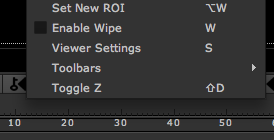
And here is how to add the hotkey (in this case "shift+d") in your menu.py. Note that I am attaching it to the viewer menu, which is the right click menu in the viewer:
nuke.menu( 'Viewer' ).addCommand( 'Toggle Z', 'zToggle()', 'shift+d')If you keep the function itself in the menu.py the above is all you need. If you keep the function in an external file, you will have to import it into the menu.py first.