Setting up Prman for Nuke 6.2 launched from the gui in OSX
Some people are having issues getting Prman working with Nuke 6.2. So this is a basic tutorial on setting up the proper environment variables you need. This only works when Nuke is launced from the gui under osx. I have a separate tutorial for getting it to work when you launch Nuke from the shell.
1. Download the system preference pane called RCEnvironment and install it.
This prefpane is for creating an environment.plist file which osx needs for setting environment variables for gui applications..
http://www.rubicode.com/Software/RCEnvironment/
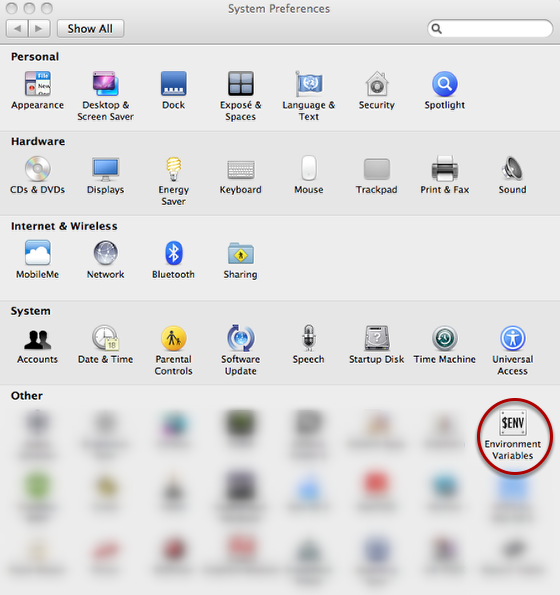
2. Add the following environment variables below in RCEnvironment. Adjust the values to match you version of Prman which may be different then mine.
variable = DYLD_LIBRARY_PATH
value = /Applications/Pixar/RenderMan.app/Versions/RenderManProServer-15.2/lib/
variable = RMANTREE
value = /Applications/Pixar/RenderMan.app/Versions/RenderManProServer-15.2/
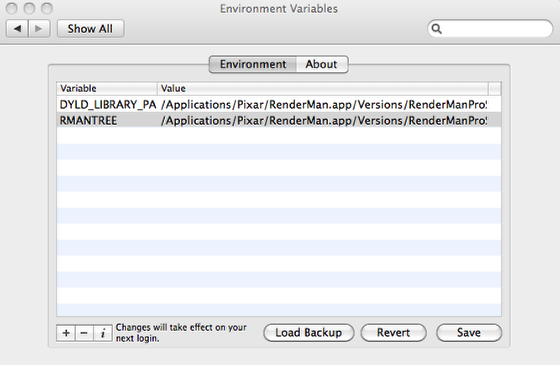
3. Log out and Log back in again.
4. Now launch Nuke and the Prman node should now work.
FYI: The utility above modifies your $HOME/.MacOSX/environment.plist. The environment.plist file will look something like this if you we're to look at it in a text editor:
