Two Nodes designed to recolor Deepcolor data without completely projecting the same color onto all samples, so that information is preserved giving you more flexibility grading Deep data.
Deep Sample Recolor Tools
First submitted: 15 January 2026
Author: Jorrit Schulte
Compatible Nuke versions: 14.0 or later
Compatibility: Linux, Mac, Windows
These two Nodes are designed to recolor Deepcolor data without completely projecting the same color onto all samples, this way more information is preserved giving you more flexibility grading Deep data.

DeepDivMult
Deep divmult uses the divide/multiply process to match deep samples to a target color, instead of multiplying each pixel, it applies the divided image to each sample.
take this pointcloud of a simple scene with a foreground character on a background.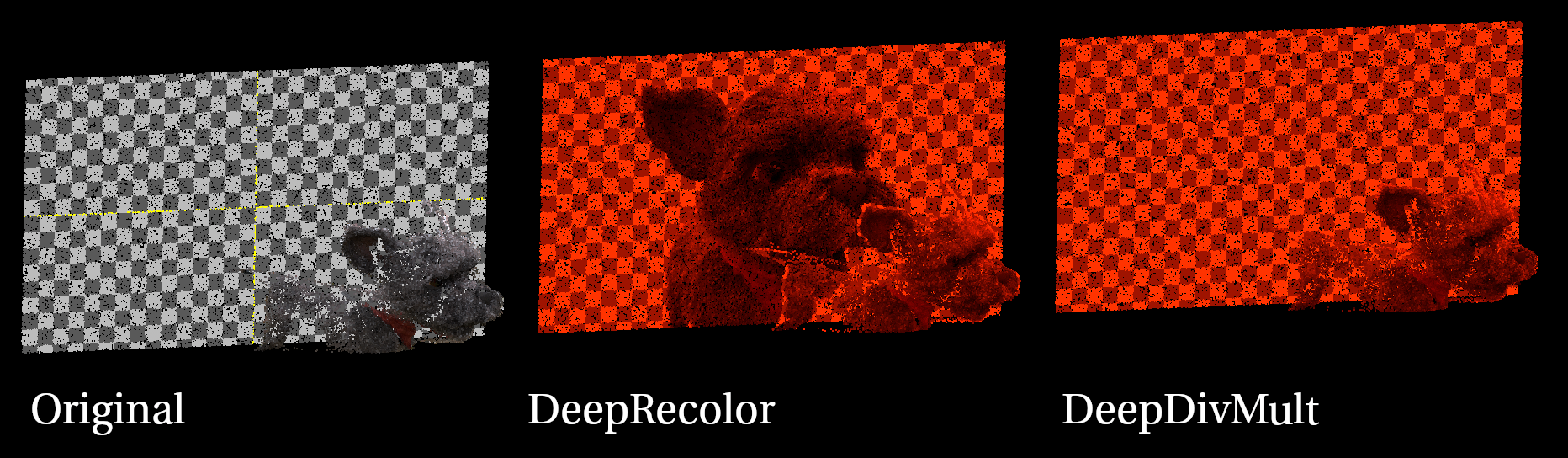
if we try to recolor this with a DeepRecolor, the front color will get projected onto the background, now when we do any kind of deep defocus or deep crop, the image behind will show up where there should be a checkerboard. Instead, when whe DeepDivmult, each sample is multiplied with the target image, and the resulting deep samples maintain information of the background.
Another example, below, you can see how recoloring a deep image projects the background smoke onto the semi transparent foreground, DeepDivMult allows you to recolor the samples seperately.

of course things like gamma corrections will still result in some ghosting but this will still give you more leeway especially with more complicated scenes than the simple examples shown here.
DeepRecolorFrontSamples
Sometimes you want to recolor the very front sample only, leaving the backgroud untouched completely. In the point cloud in the example below we are using a matte to grade the foreground character red.

DeepRecolor will obviously project the foreground unto the background samples, and DeepDivmult still applies the grade of the character on samples behind it. Here you can use DeepRecolorFrontSamples to only recolor the frontmost samples, leaving the back samples untouched.
DeepRecolorFrontSamples can also recolor every semi transparent sample until it hits a fully opaque sample, leaving hidden samples untouched.
or register to download or rate.
Comments