Auto-aligns two images or sequences by visual content, similar in concept to Photoshop's Auto-Align Layers. Exports to Transform or CornerPin2D. Supports different input resolutions. Requires NukeX.
MatchTransform
First submitted: 30 March 2026
Updated: 31 March 2026
Author: Francesco Lorussi
Website: https://github.com/francescolorussi/MatchTransform
Compatible Nuke versions: 13.0 or later
Compatibility: Linux, Mac, Windows

MatchTransform is a Nuke gizmo that lets you automatically align two images based on their visual content, similar in concept to Photoshop's Auto-Align Layers.
Connect a Source and a Reference — it finds matching features between the two images and figures out the transform needed to line them up. The result is baked directly into a standard Transform or CornerPin2D node. Different input resolutions are handled automatically — any Reformat nodes needed are created alongside the output node.
Bad matches are filtered out automatically, so you get a clean result even on tricky inputs. The entire solver is implemented in pure Python with no external dependencies.
Requires NukeX, as it relies on the built-in CameraTracker for feature detection.
Usage
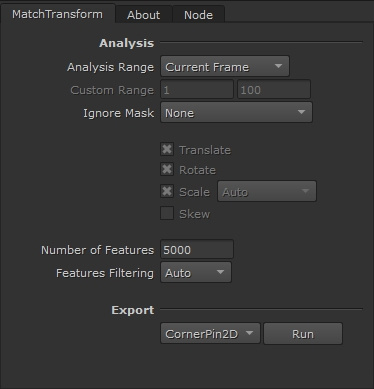
Connect your inputs: plug the Source image into the first input and the Reference image into the second input. The gizmo will compute the transformation that aligns the Source to the Reference.
Choose the frame range: select the frames you want to align.
Current Frame — analyses only the current viewer frame. Use this for a quick single-frame alignment.
Custom Range — analyses the frame range defined by the Custom Range fields.
Input Clips Range — analyses the overlapping frame range between the Source and Reference inputs.
Note: In sequence mode, each frame pair is matched independently — so small variations in feature matching can cause jitter in the output. If Source and Reference are unrelated sequences (different content per frame), each frame may still align correctly on its own, but the overall result will be temporally inconsistent.
Choose which components to solve for (Transform mode only): Translation, Rotation, Scale, and Skew can each be enabled or disabled independently. For example, if you only need to correct a zoom difference, enable Scale only and leave the rest unchanged.
Use the Ignore Mask (optional): use the Ignore Mask to exclude regions from feature detection — it reads the alpha channel of both inputs to mask out areas that would produce unreliable matches.
Set the number of features: controls how many features the internal CameraTracker will detect. More features can improve accuracy but increase processing time.
Adjust the filtering level if needed: controls how aggressively bad feature matches are discarded. Auto is the recommended default — it adapts automatically based on the input. The other presets (Off, Low, Medium, Strong) are there if you need to fine-tune the behaviour manually.
Choose the output type:
Transform — produces a Transform node using the degrees of freedom selected in step 3 (Translation, Rotation, Scale, Skew).
CornerPin — produces a CornerPin2D node (full perspective).
Compatibility
NukeX required — the gizmo relies on the built-in CameraTracker node for feature detection, which is only available in NukeX. Tested on Nuke 13+.
Examples
Example 1 — feature matches between Source and Reference
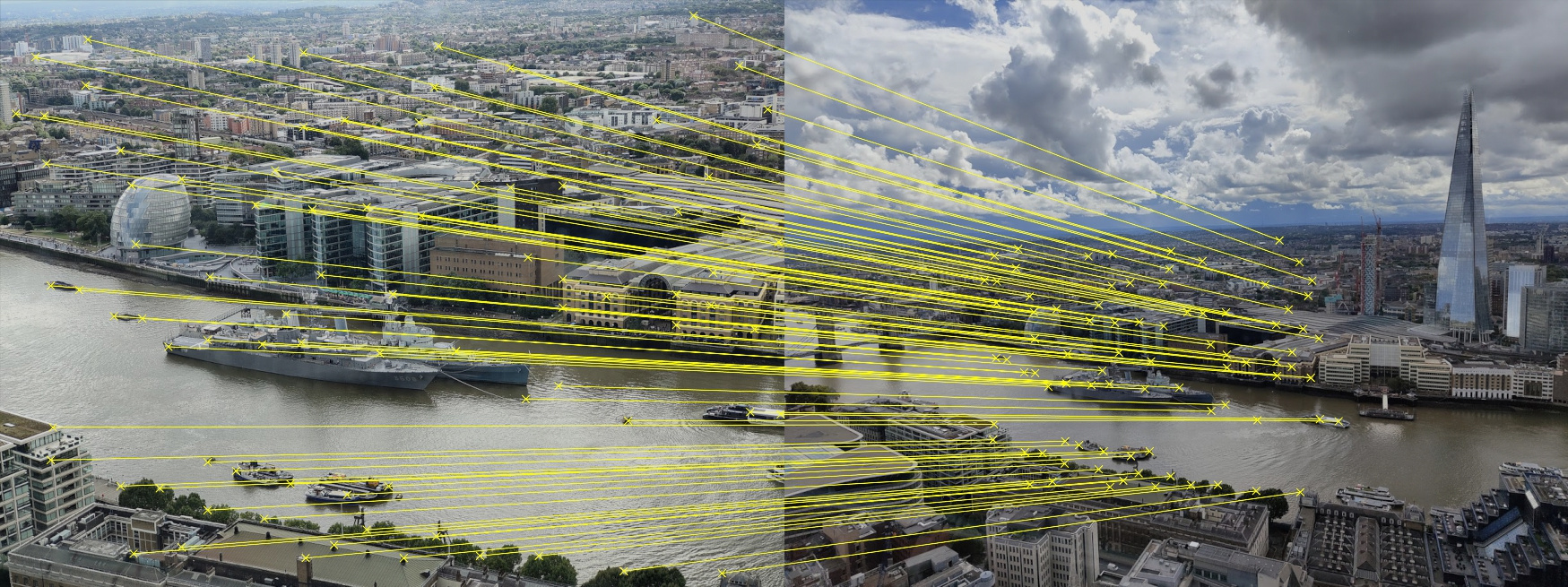
Result — composited using the generated CornerPin

Example 2 — feature matches between Source and Reference
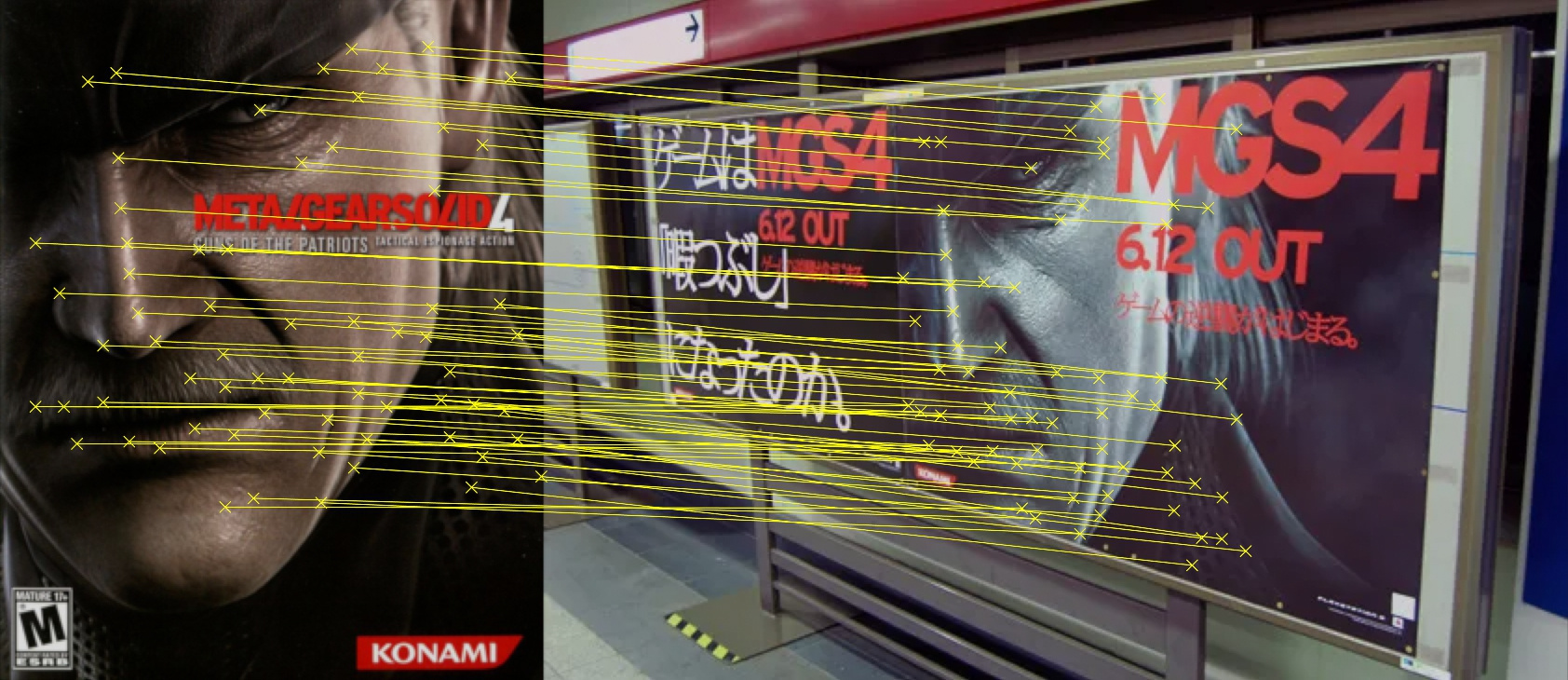
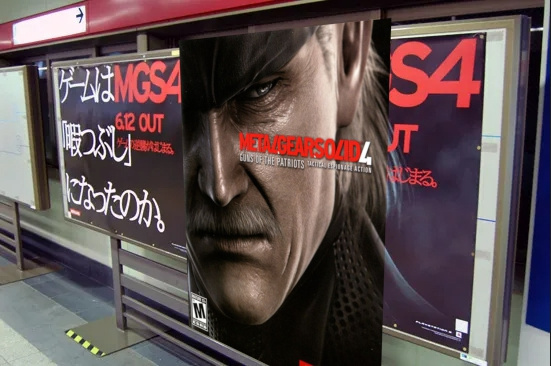
Result — composited using the generated CornerPin
Installation
1. Copy MatchTransform.gizmo to your gizmos folder, creating it if it doesn't exist:
~/.nuke/gizmos/
2. Register the folder in ~/.nuke/init.py:
nuke.pluginAddPath("gizmos")3. Add it to a custom menu in ~/.nuke/menu.py:
toolbar = nuke.menu("Nodes")
my_menu = toolbar.addMenu("MyGizmos")
my_menu.addCommand("MatchTransform", "nuke.createNode('MatchTransform')")
Changelog
v1.0.0
Initial release
MIT License
Copyright (c) 2026 Francesco Lorussi
Permission is hereby granted, free of charge, to any person obtaining a copy
of this software and associated documentation files (the "Software"), to deal
in the Software without restriction, including without limitation the rights
to use, copy, modify, merge, publish, distribute, sublicense, and/or sell
copies of the Software, and to permit persons to whom the Software is
furnished to do so, subject to the following conditions:
The above copyright notice and this permission notice shall be included in all
copies or substantial portions of the Software.
THE SOFTWARE IS PROVIDED "AS IS", WITHOUT WARRANTY OF ANY KIND, EXPRESS OR
IMPLIED, INCLUDING BUT NOT LIMITED TO THE WARRANTIES OF MERCHANTABILITY,
FITNESS FOR A PARTICULAR PURPOSE AND NONINFRINGEMENT. IN NO EVENT SHALL THE
AUTHORS OR COPYRIGHT HOLDERS BE LIABLE FOR ANY CLAIM, DAMAGES OR OTHER
LIABILITY, WHETHER IN AN ACTION OF CONTRACT, TORT OR OTHERWISE, ARISING FROM,
OUT OF OR IN CONNECTION WITH THE SOFTWARE OR THE USE OR OTHER DEALINGS IN THE
SOFTWARE.
or register to download or rate.
Comments