Nuke 14.1 viewer overlay for adding named, colour-coded timeline markers. Semi-transparent with DWM blur. Markers saved in the .nk script. C++ and Python.
Timebar Markers
First submitted: 20 March 2026
Updated: 21 March 2026
Author: Marty Blumen
Website: https://www.martyblumen.com/
Compatible Nuke versions: 14.0 or later
Compatibility: Source
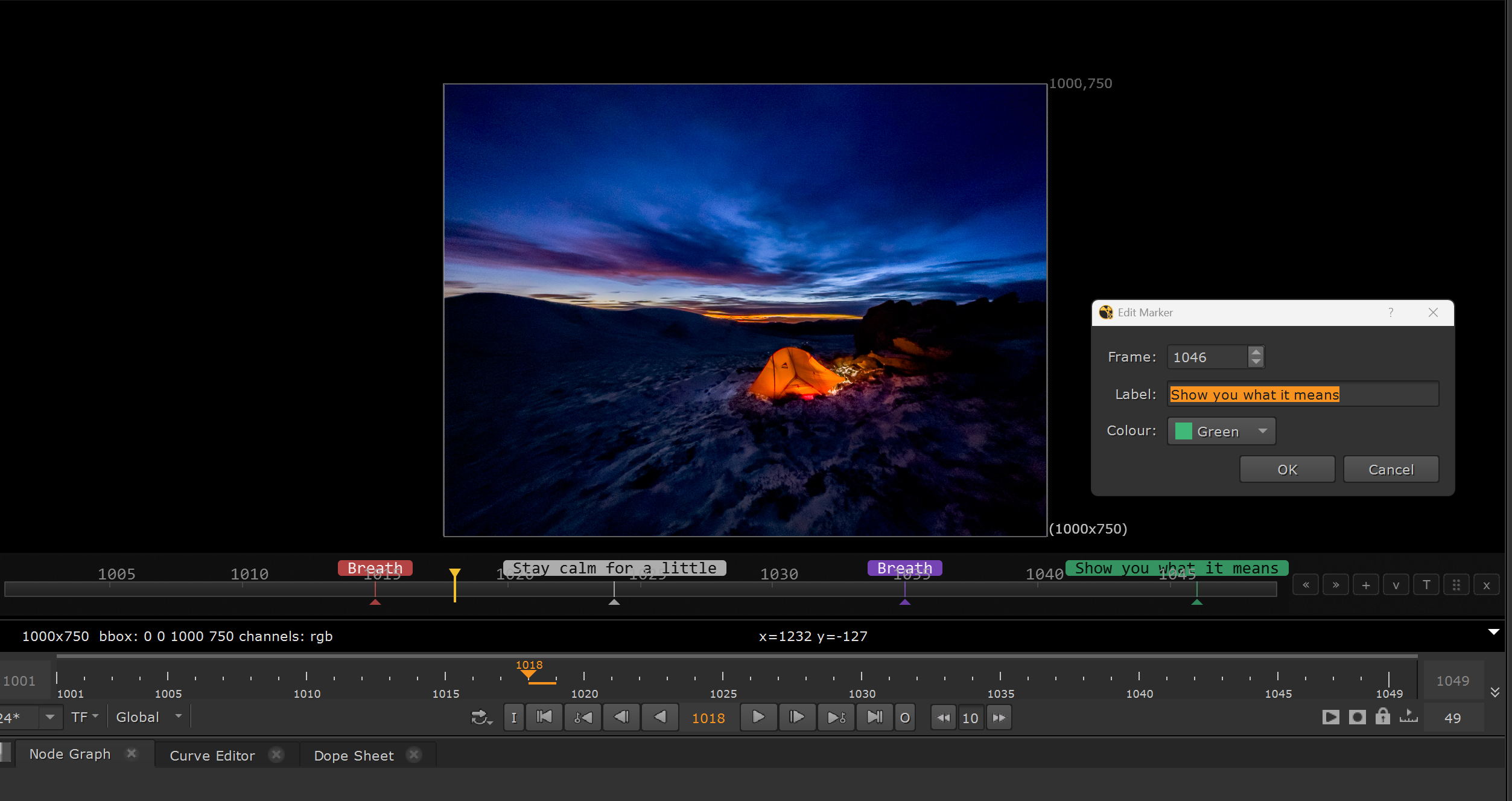
Marker Timebar adds a draggable, semi-transparent timebar overlay directly inside Nuke's viewer pane, complementing the native timeline with named, colour-coded markers at arbitrary frames.
Features
Overlay sits inside the viewer canvas with Windows DWM acrylic blur behind it
Add markers via the + button, double-click or right-click on the bar — each has a frame number, label and colour
Colour-coded label pills displayed above the bar for quick visual reference
Navigate between markers with << and >> buttons
Collapse to a thin bar to save screen real estate, expand back with one click
Drag the ⠿ handle to reposition the bar vertically anywhere in the viewer
Three opacity levels (ghost / semi / solid) cycled with the T button
Alt+M toggles the overlay on and off — position remembered and scales correctly when the viewer goes fullscreen with Spacebar
Hides automatically when the node graph goes fullscreen
Inset from viewer edges — won't cover rotopaint tools or 3D viewport controls
Marker Storage
Markers are stored as a hidden JSON knob on Nuke's Root node, so they travel with the .nk file without creating any nodes in the graph. No F-key zoom-out issues. If a colleague opens the script without the tool installed it has no effect whatsoever.
Two versions included
The C++ version (Nuke 14.1 / Windows 11) delivers genuine Windows DWM acrylic blur behind the overlay. The Python/PySide2 version works as a fallback and includes a full floating marker list panel.
Build from Source
https://github.com/bratgot/Timebarmarkers
MIT License
Copyright (c) 2026 Marten Blumen
Permission is hereby granted, free of charge, to any person obtaining a copy
of this software and associated documentation files (the "Software"), to deal
in the Software without restriction, including without limitation the rights
to use, copy, modify, merge, publish, distribute, sublicense, and/or sell
copies of the Software, and to permit persons to whom the Software is
furnished to do so, subject to the following conditions:
The above copyright notice and this permission notice shall be included in all
copies or substantial portions of the Software.
THE SOFTWARE IS PROVIDED "AS IS", WITHOUT WARRANTY OF ANY KIND, EXPRESS OR
IMPLIED, INCLUDING BUT NOT LIMITED TO THE WARRANTIES OF MERCHANTABILITY,
FITNESS FOR A PARTICULAR PURPOSE AND NONINFRINGEMENT. IN NO EVENT SHALL THE
AUTHORS OR COPYRIGHT HOLDERS BE LIABLE FOR ANY CLAIM, DAMAGES OR OTHER
LIABILITY, WHETHER IN AN ACTION OF CONTRACT, TORT OR OTHERWISE, ARISING FROM,
OUT OF OR IN CONNECTION WITH THE SOFTWARE OR THE USE OR OTHER DEALINGS IN THE
SOFTWARE.
or register to download or rate.
Comments