Area light with soft shadows for ScanlineRender2. Uses a multi-light grid to produce smooth penumbras from Nuke 17's built-in hard shadow renderer.
Area Light / SoftBox
First submitted: 24 February 2026
Updated: 25 February 2026
Author: Marty Blumen
Website: https://www.martyblumen.com/
Compatible Nuke versions: All
Compatibility: Source
Overview
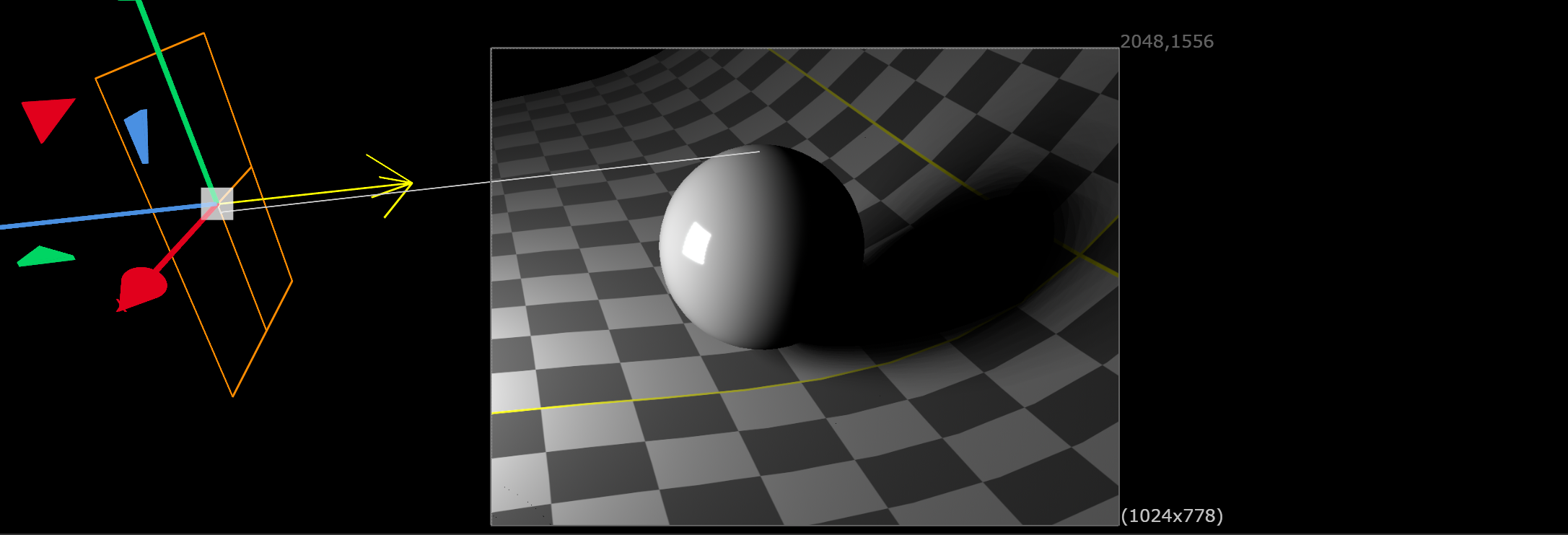
AreaLight is a GeomOp plugin that adds soft shadow support to ScanlineRender2. Nuke's built-in light shaders only cast hard shadows - this node produces smooth, physically plausible penumbras by emitting a grid of sub-lights spread across the light surface.
How It Works
ScanlineRender2's built-in DiskLight shader shoots a single shadow ray per light, producing hard-edged shadows. AreaLight works around this by creating multiple DiskLightPrims arranged in a grid across a rectangular light surface. Each sub-light casts its own hard shadow from a slightly different position, and the overlapping penumbras blend into a smooth gradient.
This is the same technique used in production VFX before stochastic shadow sampling became standard.
Features
• Soft shadows via multi-light grid (1 to 64+ sub-lights)
• Artist-friendly Shadow Samples knob controls quality/speed tradeoff
• Energy conserving - total illumination stays constant regardless of sample count
• Full transform support - translate, rotate, scale via standard Axis knob
• Viewport wireframe - orange rectangle with direction arrow
• USD native - creates standard DiskLightPrims on the scene graph
Installation
Copy AreaLight.dll and menu.py to your ~/.nuke/ directory
Restart Nuke 17
Find AreaLight under 3D > Lights in the toolbar
Usage
Create an AreaLight node and connect it to your scene
Set Width and Height for the light surface size
Adjust Intensity, Exposure, and Color as needed
Set Shadow Samples to control shadow softness
Recommended values:
• 1 = hard shadow (fastest, good for look-dev)
• 16 = smooth penumbras (recommended)
• 64 = very smooth (final renders)
Connect to ScanlineRender2 and render
Tips
• Shadow softness is determined by the light's physical size — larger lights produce wider penumbras
• Shadow Samples controls smoothness, not penumbra width
• Keep samples at 1 during look-dev, increase for final renders
• Render time scales linearly with sample count
Requirements
• Nuke 17.0 or later
• ScanlineRender2
• Windows (compiled against Nuke 17.0v1)
Build From Source
Requires Visual Studio 2022 and CMake 3.20+
cmake -S . -B build --preset vs2022
cmake --build build --config Release
https://github.com/bratgot/SoftBox
Installation
# AreaLight — Soft shadow area light for ScanlineRender2
# Place this file and AreaLight.dll in your ~/.nuke/ directory

import nuke

toolbar = nuke.toolbar("Nodes")
lightMenu = toolbar.addMenu("3D/Lights", icon="Light.png")
lightMenu.addCommand("AreaLight", "nuke.createNode('AreaLight')", icon="Light.png")
MIT License
Copyright (c) 2026 Marten Blumen
Permission is hereby granted, free of charge, to any person obtaining a copy
of this software and associated documentation files (the "Software"), to deal
in the Software without restriction, including without limitation the rights
to use, copy, modify, merge, publish, distribute, sublicense, and/or sell
copies of the Software, and to permit persons to whom the Software is
furnished to do so, subject to the following conditions:
The above copyright notice and this permission notice shall be included in all
copies or substantial portions of the Software.
THE SOFTWARE IS PROVIDED "AS IS", WITHOUT WARRANTY OF ANY KIND, EXPRESS OR
IMPLIED, INCLUDING BUT NOT LIMITED TO THE WARRANTIES OF MERCHANTABILITY,
FITNESS FOR A PARTICULAR PURPOSE AND NONINFRINGEMENT. IN NO EVENT SHALL THE
AUTHORS OR COPYRIGHT HOLDERS BE LIABLE FOR ANY CLAIM, DAMAGES OR OTHER
LIABILITY, WHETHER IN AN ACTION OF CONTRACT, TORT OR OTHERWISE, ARISING FROM,
OUT OF OR IN CONNECTION WITH THE SOFTWARE OR THE USE OR OTHER DEALINGS IN THE
SOFTWARE.
or register to download or rate.
Comments