Extract translate, rotate & scale from vertex motion. Track rigid body animation using point cloud alignment, then bake or link to any 3D node.
SnapBake3D
First submitted: 28 February 2026
Author: Marty Blumen
Website: https://www.martyblumen.com/
Compatible Nuke versions: 16.0 or later
Compatibility: Source
SnapBake3D — Vertex-Driven Transform Extraction for Nuke
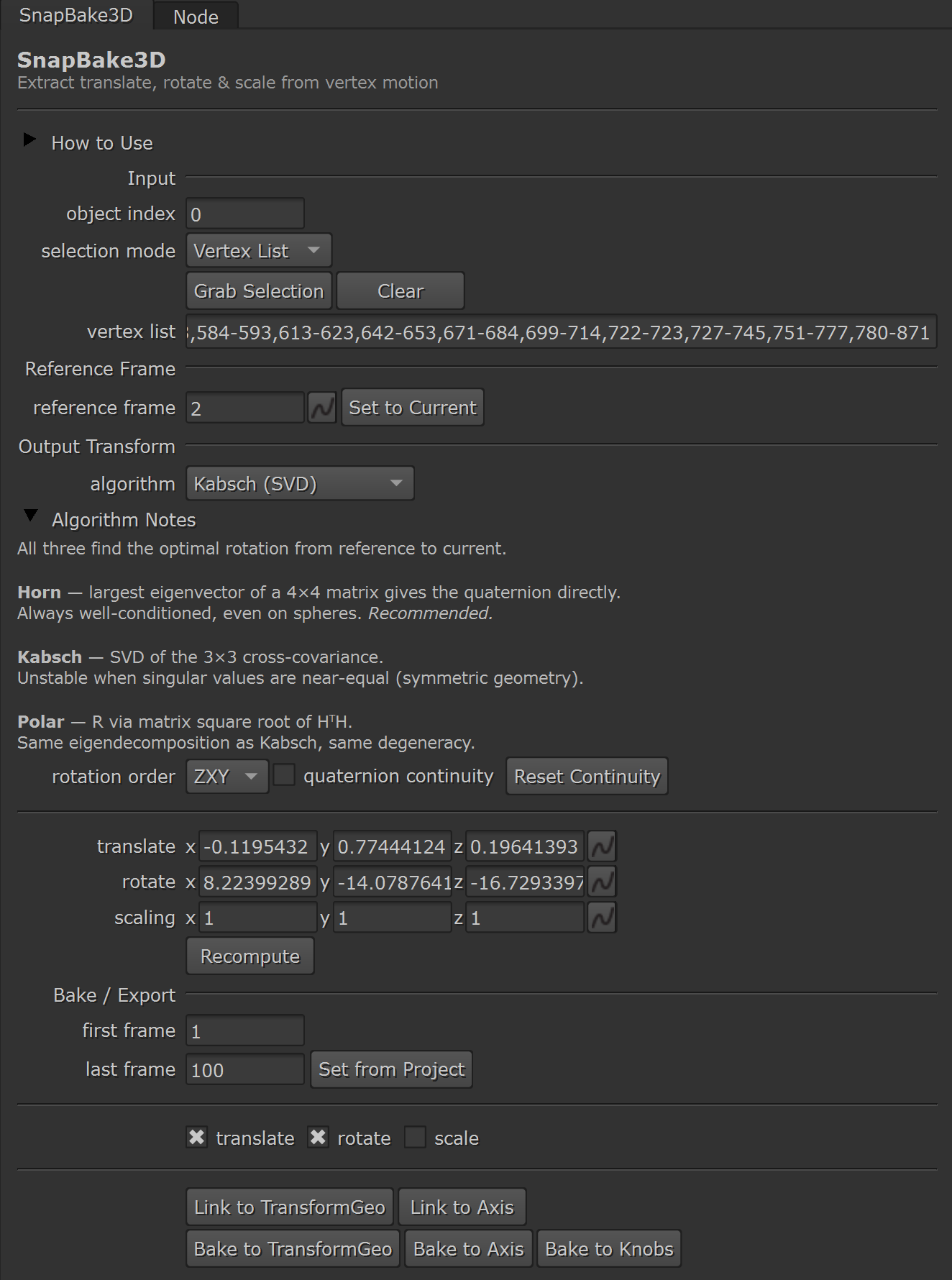
SnapBake3D extracts translate, rotate, and scale animation directly from moving vertices in Nuke's 3D system. It works by aligning point clouds between a reference frame and the current frame, computing the rigid body transformation that best maps one to the other.
How It Works
Connect any animated geometry, select the vertices you want to track, set a reference frame, and click Recompute.
The translate, rotate, and scale knobs update live as you scrub the timeline. Once satisfied, you can Bake the animation to keyframes or Link it directly to a TransformGeo or Axis node.
Features
Three alignment algorithms:
Horn (quaternion)
Kabsch (SVD)
Polar Decomposition
Per-axis scale extraction — independent X / Y / Z scale via RMS ratio
Quaternion continuity prevents 180° rotation flips
Flexible vertex selection — manual ranges (example:
0–10,15,20–25) or all verticesLive updating transform knobs — translate, rotate, scale update interactively
Bake to keyframes or Link via live expressions
Channel filtering — export only the channels you need
Single-file C++ plugin with Python utilities
No external dependencies
Algorithms
Horn (default) is recommended for most geometry. It uses a quaternion eigenvector method that remains stable even with symmetric or degenerate vertex distributions.
Kabsch and Polar Decomposition are included for comparison, validation, and edge cases.
Workflow
Connect animated geometry to SnapBake3D
Select vertices in the 3D Viewer, click Grab Selection
Set the Reference Frame to the rest pose
Click Recompute to cache the reference
Scrub the timeline to verify results
Use:
Bake → creates keyframed TransformGeo / Axis
Link → creates live expressions for iterative workflows
Tips
Spread vertices across the surface for best rotation stability
Use All Vertices mode for rigid objects
Use Link during iteration, Bake for final delivery
Enable Quaternion Continuity for large rotations
Reset continuity if jumping to a distant frame
Requirements
Nuke 14+ (tested with Nuke 16)
CMake 3.14+
C++17 compiler
GCC 11+
Visual Studio 2022
Xcode Clang
See README for build instructions.
Open Source
Source code and build instructions:
https://github.com/bratgot/SnapBake3D
License: MIT
MIT License
Copyright (c) 2026 Marten Blumen
Permission is hereby granted, free of charge, to any person obtaining a copy
of this software and associated documentation files (the "Software"), to deal
in the Software without restriction, including without limitation the rights
to use, copy, modify, merge, publish, distribute, sublicense, and/or sell
copies of the Software, and to permit persons to whom the Software is
furnished to do so, subject to the following conditions:
The above copyright notice and this permission notice shall be included in all
copies or substantial portions of the Software.
THE SOFTWARE IS PROVIDED "AS IS", WITHOUT WARRANTY OF ANY KIND, EXPRESS OR
IMPLIED, INCLUDING BUT NOT LIMITED TO THE WARRANTIES OF MERCHANTABILITY,
FITNESS FOR A PARTICULAR PURPOSE AND NONINFRINGEMENT. IN NO EVENT SHALL THE
AUTHORS OR COPYRIGHT HOLDERS BE LIABLE FOR ANY CLAIM, DAMAGES OR OTHER
LIABILITY, WHETHER IN AN ACTION OF CONTRACT, TORT OR OTHERWISE, ARISING FROM,
OUT OF OR IN CONNECTION WITH THE SOFTWARE OR THE USE OR OTHER DEALINGS IN THE
SOFTWARE.
or register to download or rate.
Comments