Fast keyboard-driven node creation & knob editing. Create a node and immediately set a pre-defined knob without opening the properties panel.
QuickNode
First submitted: 4 March 2026
Author: Timo Aaldriks
Website: https://www.layeredframes.com
Compatible Nuke versions: 11.0 or later
Compatibility: Source
This script allows you to create a node and immediately set a pre-defined knob without opening the properties panel. Primarily designed to use with the merge node but can be used for almost any node and most knobs. Works with Nuke Indie, easy to setup.
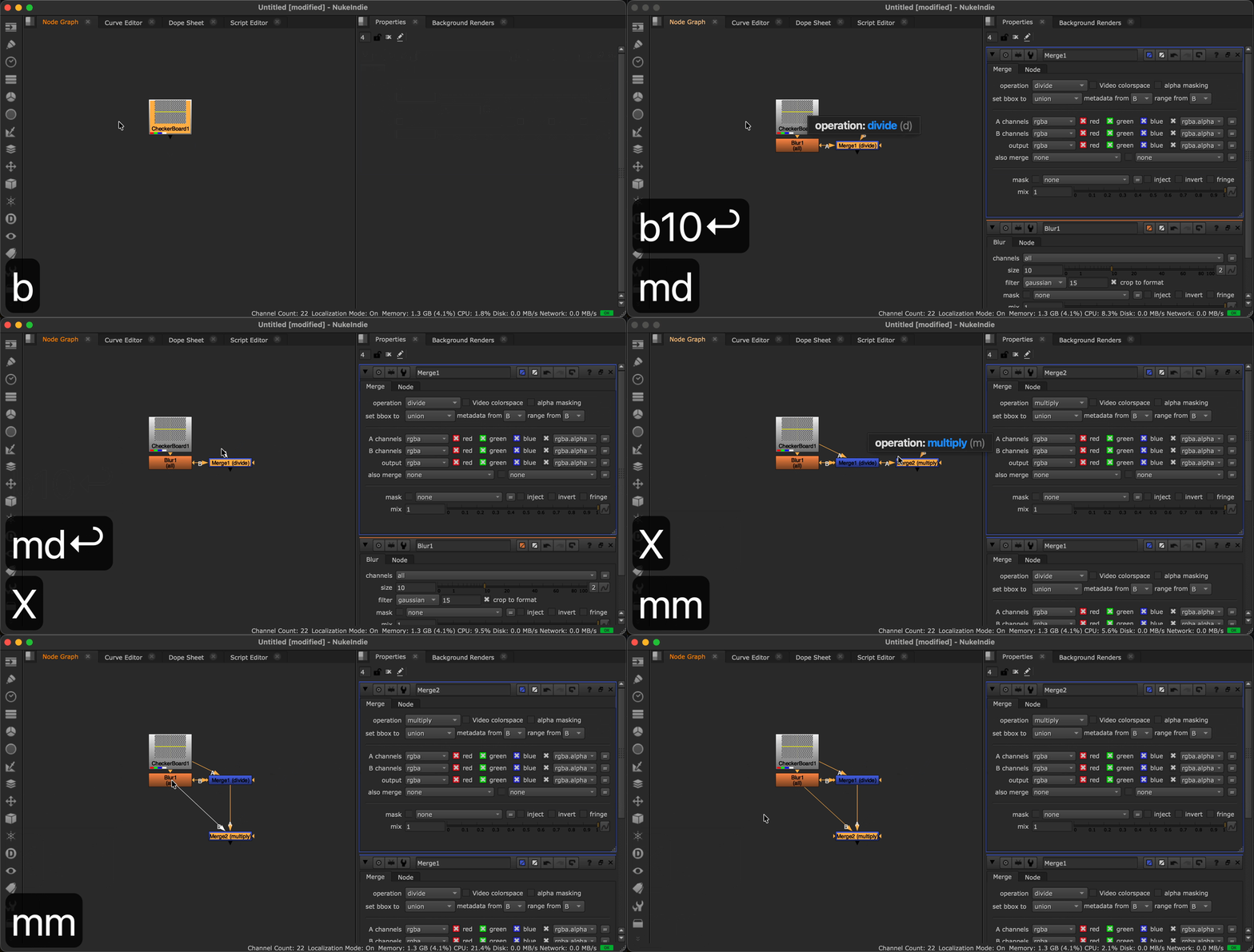
After creating a node, you can type any character to set the value of e pre-defined knob. No need to type the values exactly, it uses filtering to select the closest option. You can even specify a list of options in a particular order to customize which options are favored.
For example, to create a divide merge, you only need to type m d, to create a multiply merge: m m, for a stencil merge m s or m c d for a color-dodge merge.
It also works for numerical fields. So for example a blur node with size 10 can be created by pressing b 10 (works with decimal values too).
It shows a label above the node to show which value is selected.
The label disappears automatically after a specified timeout (can be either set globally or per node), when you press enter/return or click anywhere outside the label. Pressing escape wil discard the change and revert to the original value.
Tested on Windows and MacOS with Nuke 16 but should work on linux and with Nuke 11 and above
Basic Setup:
Just place the QuickNode.py script in your .nuke folder (or any pluginpath folder where nuke can find scripts). Then import QuickNode and specify the nodes with their knobs in your menu.py:
import QuickNode

QuickNode.add_quicknode(
    node_class='Merge2',
    knob='operation',
    hotkey='m',
    options=QuickNode.DEFAULT_MERGE_OPTIONS,
    timeout=0.75
)

QuickNode.add_quicknode(
    node_class='Blur',
    knob='size',
    hotkey='b',
    timeout=1
)
For enumeration knobs (like the merge's operation knob) you can specify a list of options in the order of what is most likely to be used so those options need the least amount of keystrokes. If the options argument is omitted, the order is determined by the knob.
QuickNode includes a list of default merge options which is my personal preference but can be easily edited/customized.
Advanced options
QuickNode can also be triggered from a custom function call, button or menu. Just use the QuickNode.createNode function, which is similar to nuke.createNode but with the added functionality.
QuickNode.createNode(
    node_class='Blur',
    knob='size',
    knobs='', # Optional tcl string of knob settings like: "size 10 filter box"
    timeout=1,
    inpanel=False
)
There are also functions included to edit existing nodes (useful for groups that don't have a specific Class). You could add this to a menu item with your own shortcut for example.
node = nuke.selectedNode()
QuickNode.editNode(
    node,
    knob='size',
    timeout=1
)
You can also register a node class, and use QuickNode.editWithConfig to create a general shortcut to edit any node that is registered.
In this example the QuickNode editor won't get triggered upon the creation of a grade node, but you can edit afterwards.
QuickNode.add_config(
    node_class='Grade',
    knob='multiply',
    timeout=5
)

menubar.addCommand("@;QuickNodeEdit", "QuickNode.editNodeWithConfig(nuke.selectedNode())", "shift+e")
The "@;" is used to add a hidden menu item that doesn't clutter your menu's
or register to download or rate.
Comments