Nuke Label Studio lets artists visually edit node labels with live preview, formatting tools, and safe, cross-version workflow in Nuke.
Label Studio
First submitted: 11 February 2026
Updated: 13 February 2026
Author: Marty Blumen
Website: https://www.martyblumen.com/
Compatible Nuke versions: 11.0 or later
Compatibility: Source
Nuke Label Studio – Smart HTML Label Editor v1.2
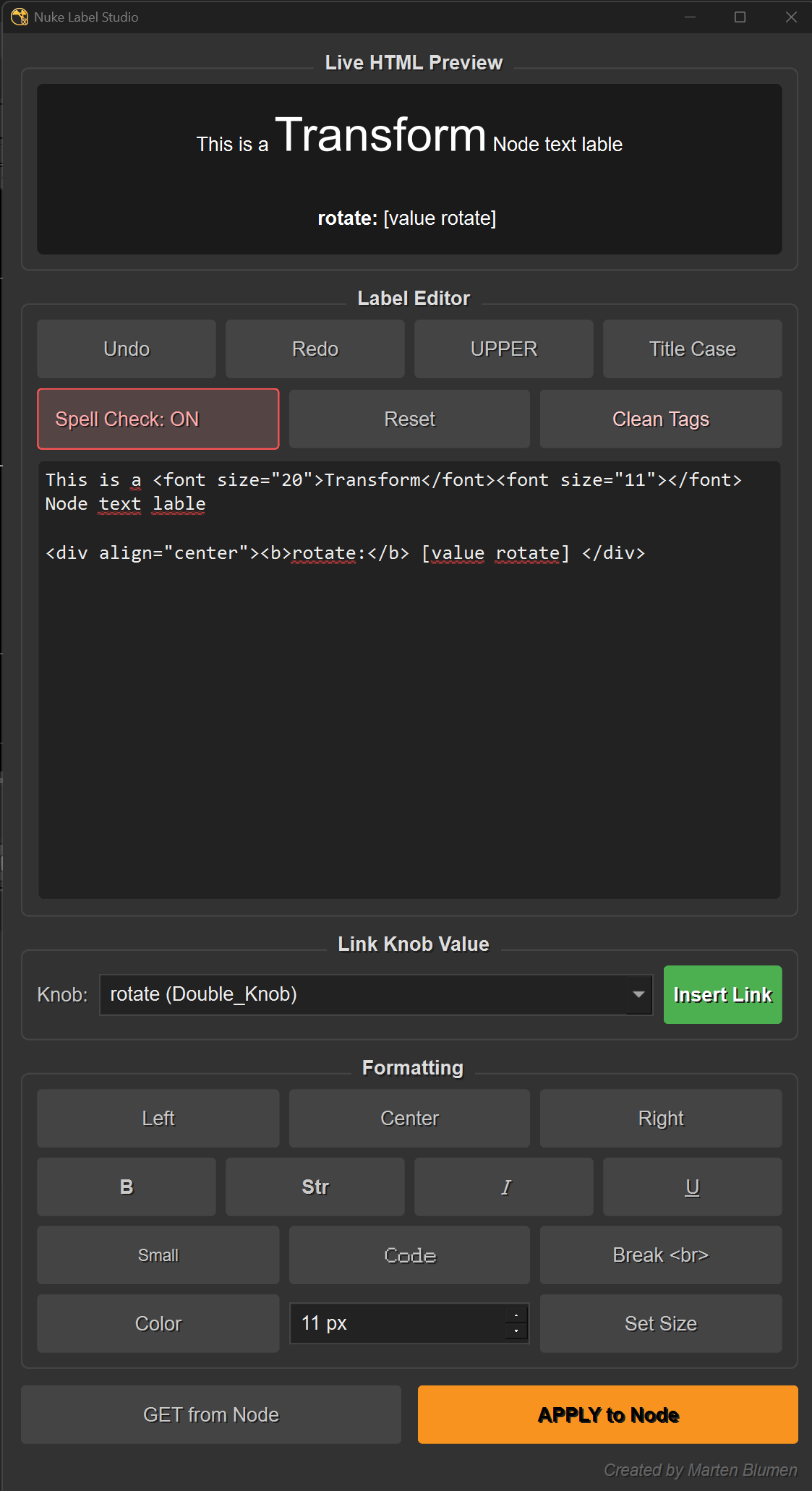
Nuke Label Studio is a powerful label editing utility designed for compositors who want clean, readable, and production-ready node labels. It combines a smart, VFX-aware spell checker with full HTML formatting and dynamic knob linking to streamline labeling in Nuke.
Key Features:
Dynamic Knob Linking: Instantly fetch any knob from the selected node and insert it as a live TCL expression (e.g.,
[value mix]), complete with bolded labels.VFX-Aware Spell Checker: A custom dictionary built for compositors (recognizes "Alpha", "Roto", "Premult", "Keylight", etc.) with right-click suggestions and wave-underlined misspellings.
Real-time HTML Preview: See exactly how your label will look in the DAG as you type, including color, size, and line breaks.
Smart Formatting Tools:
Styles: Bold, Italic, Underline, Strong, Small, and Code (Monospace).
Alignment: Left, Center, and Right justification.
Color & Size: Integrated color picker and adjustable font size spinbox (8–200px).
Case Conversion: One-click conversion for UPPERCASE and Title Case (Camel Case).
SmartTextEdit: Full standard text editing with unlimited Undo/Redo.
Clean Up Tools: "Clean Tags" button to strip HTML for plain text, and "Reset" to revert to the node's original label.
Full Node Integration: seamless "Get" and "Apply" workflow for selected Nuke nodes.
Universal Compatibility: Works across Nuke 11–16+ (Auto-detects PySide2 & PySide6).
Place in menu.py
import nuke

# 1. Define the function to launch the panel
def launch_label_studio():
    import LabelStudio
    # We use a global variable to keep the window alive
    global label_studio_panel
    try:
        label_studio_panel.close()
    except:
        pass
    label_studio_panel = LabelStudio.NukeLabelStudio()
    label_studio_panel.show()

# 2. Add it to the Nuke Menu
# This creates a menu called "Marten's Tools" (or adds to it if it exists)
marten_menu = nuke.menu("Nuke").addMenu("Marten's Tools")

# Add the command with a keyboard shortcut (Optional, e.g., 'Alt+L')
marten_menu.addCommand("Nuke Label Studio", "launch_label_studio()", "Alt+L")
BSD 3-Clause License
Copyright (c) 2026, Marten Blumen
All rights reserved.
Redistribution and use in source and binary forms, with or without modification, are permitted provided that the following conditions are met:
1. Redistributions of source code must retain the above copyright notice, this list of conditions, and the following disclaimer.
2. Redistributions in binary form must reproduce the above copyright notice, this list of conditions, and the following disclaimer in the documentation and/or other materials provided with the distribution.
3. Neither the name of the copyright holder nor the names of its contributors may be used to endorse or promote products derived from this software without specific prior written permission.
THIS SOFTWARE IS PROVIDED BY THE COPYRIGHT HOLDERS AND CONTRIBUTORS "AS IS" AND ANY EXPRESS OR IMPLIED WARRANTIES, INCLUDING, BUT NOT LIMITED TO, THE IMPLIED WARRANTIES OF MERCHANTABILITY AND FITNESS FOR A PARTICULAR PURPOSE ARE DISCLAIMED. IN NO EVENT SHALL THE COPYRIGHT HOLDER OR CONTRIBUTORS BE LIABLE FOR ANY DIRECT, INDIRECT, INCIDENTAL, SPECIAL, EXEMPLARY, OR CONSEQUENTIAL DAMAGES (INCLUDING, BUT NOT LIMITED TO, PROCUREMENT OF SUBSTITUTE GOODS OR SERVICES; LOSS OF USE, DATA, OR PROFITS; OR BUSINESS INTERRUPTION) HOWEVER CAUSED AND ON ANY THEORY OF LIABILITY, WHETHER IN CONTRACT, STRICT LIABILITY, OR TORT (INCLUDING NEGLIGENCE OR OTHERWISE) ARISING IN ANY WAY OUT OF THE USE OF THIS SOFTWARE, EVEN IF ADVISED OF THE POSSIBILITY OF SUCH DAMAGE.
or register to download or rate.
Comments