sNodeBench is a Nuke gizmo for benchmarking and comparing multiple node branches.
sNodeBench
First submitted: 17 June 2026
Author: Aleš Ushakou
Website: https://www.linkedin.com/in/ales-ushakou
Compatible Nuke versions: 13.1 or later
Compatibility:
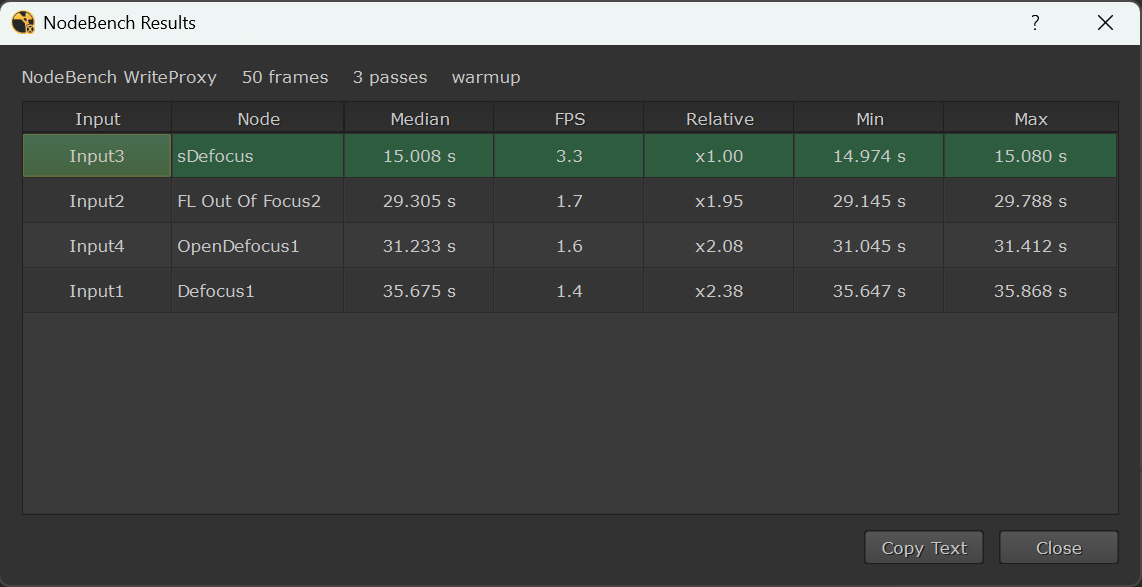
Connect different versions of a setup to its inputs, choose a frame range and number of passes, then run the benchmark. The gizmo renders each connected branch through a temporary lightweight Write node, clears Nuke caches between tests, rotates the input order between passes, and reports median/min/max render times, FPS, and relative speed.
It automatically grows or shrinks its inputs as branches are connected or disconnected, so you always have one free input ready for the next test.
Installation
Copy the sNodeBench folder into your Nuke plugin directory. The folder should contain sNodeBench.gizmo, sNodeBench_lib.py, menu.py, and the icon folder.
If Nuke does not load that folder automatically, add it to your plugin path from init.py with nuke.pluginAddPath("path/to/sNodeBench").
Restart Nuke.
You will find the gizmo in the Nodes menu under sTools > Tools > sNodeBench.
or register to download or rate.
Comments