Connect Tracker data to SplineWarp with automatic pin generation, visual linking, and live reference-frame updates.
er_nailbox
First submitted: 29 September 2026
Author: Eugene Rachevsky
Website: https://www.linkedin.com/in/vfxeugene/
Compatible Nuke versions: 12.0 or later
Compatibility: Linux, Windows
Nailbox connects Tracker data to SplineWarp pins through a visual interface, simplifying the setup of tracked image deformations without manually building expressions.
Generate paired pins directly from your tracks, or link existing pins by dragging between connectors. Reference positions follow the selected Tracker’s reference frame automatically.
Features
Automatic pin generation: Creates one joined A/B pin pair per track at its reference-frame position and links the selected side.
Visual linking: Drag between track and pin connectors to create links. Right-click a linked pin connector to restore its original animation.
A/B controls: Link either A or B endpoints. The Both view separates the two sets; generating pins in this mode links B and leaves A at the reference position.
Live reference updates: Changing the Tracker’s reference frame updates the pin reference positions automatically.
Flexible interface: Resizable lists, automatic updates, and a separate pop-out window.
Undo/redo support: Generate, link, unlink, and reset operations support Nuke’s undo system.
Self-contained distribution: All code, graphics, and the built-in Guide are embedded in the gizmo. No additional Python packages or image files are required.
Getting started
Create your tracks and set the Tracker’s reference frame.
Connect the image you want to deform to SplineWarp’s image input A.
Open Nailbox and select the Tracker and SplineWarp.
Choose Source A, Source B, or Both, then click Generate pins.
Scrub the timeline to review the deformation.
Nailbox is a standalone control tool and requires no node connections. Its A/B labels identify the endpoints of each pin pair; generated pairs deform SplineWarp’s image input A.
Please note
Generate pins replaces existing pins in the selected SplineWarp. Reset all removes all its pins and their connections. Other curves and layers are preserved. Use untransformed pins and layers for image-space tracking, and regenerate or relink after deleting or reordering Tracker rows.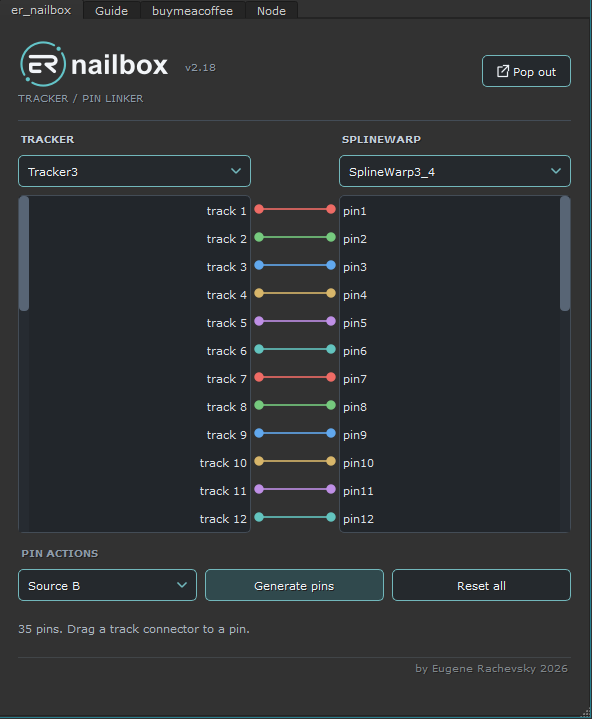
or register to download or rate.
Comments