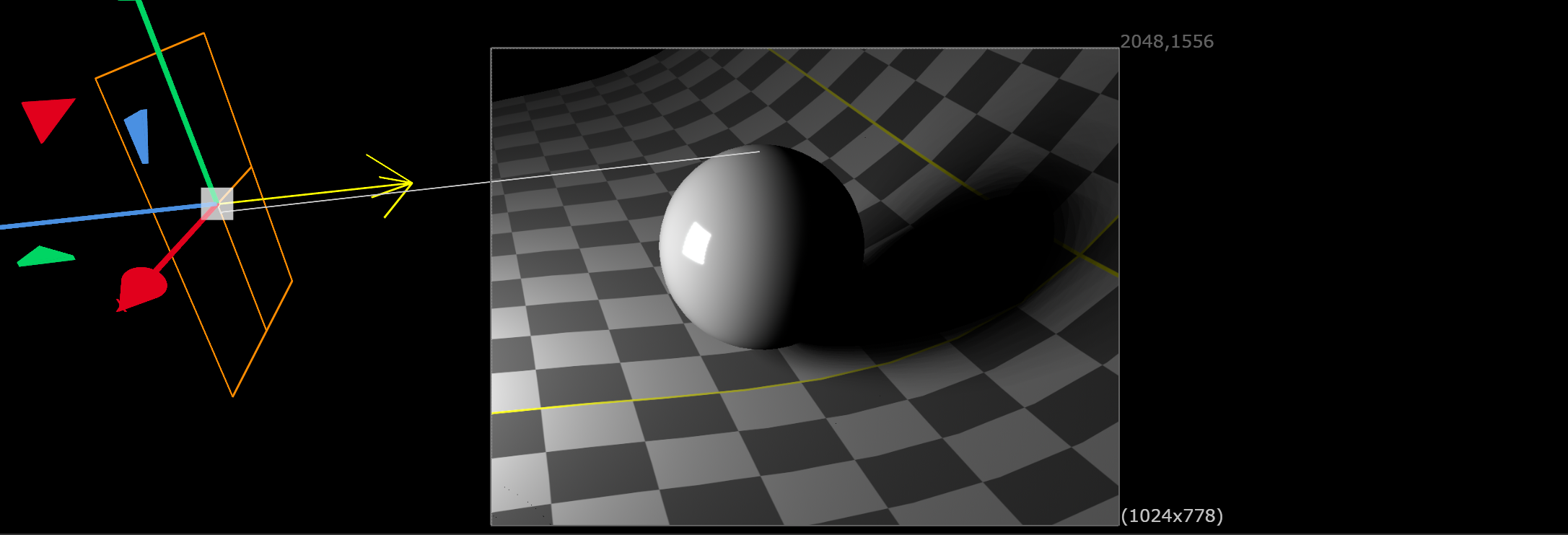
Area light with stochastic soft shadows for ScanlineRender2. Samples shadow rays across the light surface for a true, physically based penumbra - no stepped grid artifacts.
Area Light / SoftBox
First submitted: 24 February 2026
Updated: 25 September 2026
Author: Marty Blumen
Website: https://www.martyblumen.com/
Compatible Nuke versions: 17.0 or later
Compatibility: Windows, Source

Overview
ScanlineRender2's built-in lights only cast hard shadows, because they send one shadow ray to the centre of the light. SoftBox adds an AreaLight node plus a ScanlineRender2 light shader, slrRectLight, which samples shadow rays across the whole light surface the way a path tracer does. You get a smooth, physically based penumbra from a single light, and it renders faster than faking one with a grid of lights.
What's new in v1.2
Earlier versions faked the penumbra with a grid of hard-shadow lights, which shows as stepped copies of the shadow. v1.2 samples the light surface stochastically instead — same scene, same shadow samples, and it's both faster and cleaner:
16 rays: 0.23s, smooth gradient (v1.1 grid at 16 lights: 0.27s, stepped copies)
64 rays: 0.59s, clean (v1.1 grid at 64 lights: 0.78s, still stepped)
How It Works
In Nuke 17, ScanlineRender2 is a ray tracer, and it loads each USD light's shader as a plugin by name. Nuke ships shaders for Disk, Sphere, Distant and Dome lights, all of which trace a single shadow ray to the light's centre, so their shadows are hard. There is no shader for USD's RectLight — SoftBox supplies one.
In Stochastic mode (the default), the AreaLight node writes a USD RectLight, and slrRectLight.dll shades it. For each shading point, the shader traces shadow rays to jittered points across the rectangle, using ScanlineRender2's own per-sample random numbers, weighted by emission angle and inverse-square distance. Every camera sample picks new points, so the penumbra averages into a true gradient.
Grid mode keeps the original v1.0 method — a grid of hard-shadow DiskLights — for anyone who wants the old look.
Features
Stochastic soft shadows: one light, with shadow rays spread across its surface
No banding: the penumbra converges smoothly instead of stacking shadow copies
Faster than a light grid: 64 shadow rays cost less than 64 lights
Works with ScanlineRender2 sampling: raising camera samples also smooths the shadow
Grid mode for the v1.0/v1.1 look
Full transform through the standard Axis knob, with an orange rectangle wireframe and direction arrow in the viewport
USD native: writes a standard UsdLux RectLight
Installation
Download SoftBox-v1.2-Nuke17-win64.zip
Unzip it into your .nuke folder, so you get C:\Users<you>.nuke\SoftBox. Replace any older SoftBox folder.
Add this line to ~/.nuke/init.py, creating the file if needed:
nuke.pluginAddPath('./SoftBox')Restart Nuke. AreaLight is under 3D > Lights.
The zip includes builds for both Nuke 17.0 and 17.1, and SoftBox loads the one that matches your Nuke automatically.
Upgrading from v1.0: delete the old AreaLight.dll from ~/.nuke/ and the AreaLight lines from ~/.nuke/menu.py.
Usage
Create an AreaLight node and connect it to your scene.
Set Width and Height. The light's size sets how soft the shadows are.
Adjust Intensity, Exposure and Color.
On the Shadow tab, leave Shadow Mode on Stochastic and set Shadow Samples:
1: noisy; relies on ScanlineRender2 camera samples
16: smooth with light grain; for previews
64: clean; for final renders and close-ups
Render through ScanlineRender2.
Requirements: Nuke 17.0 or 17.1, Windows x64, ScanlineRender2
License: MIT
MIT License
Copyright (c) 2026 Marten Blumen
Permission is hereby granted, free of charge, to any person obtaining a copy
of this software and associated documentation files (the "Software"), to deal
in the Software without restriction, including without limitation the rights
to use, copy, modify, merge, publish, distribute, sublicense, and/or sell
copies of the Software, and to permit persons to whom the Software is
furnished to do so, subject to the following conditions:
The above copyright notice and this permission notice shall be included in all
copies or substantial portions of the Software.
THE SOFTWARE IS PROVIDED "AS IS", WITHOUT WARRANTY OF ANY KIND, EXPRESS OR
IMPLIED, INCLUDING BUT NOT LIMITED TO THE WARRANTIES OF MERCHANTABILITY,
FITNESS FOR A PARTICULAR PURPOSE AND NONINFRINGEMENT. IN NO EVENT SHALL THE
AUTHORS OR COPYRIGHT HOLDERS BE LIABLE FOR ANY CLAIM, DAMAGES OR OTHER
LIABILITY, WHETHER IN AN ACTION OF CONTRACT, TORT OR OTHERWISE, ARISING FROM,
OUT OF OR IN CONNECTION WITH THE SOFTWARE OR THE USE OR OTHER DEALINGS IN THE
SOFTWARE.
or register to download or rate.
Comments