A path tracer for Nuke that keeps instances instanced.
Instance Render (CPU/GPU)
First submitted: 25 August 2026
Updated: 26 September 2026
Author: Marty Blumen
Website: https://www.martyblumen.com/
Compatible Nuke versions: 14.0 or later
Compatibility: Windows, Source
InstanceRender
A path tracer for Nuke that keeps instances instanced.
Version 0.20.1 — Nuke 14.1–17.1 — Windows 64-bit — MIT
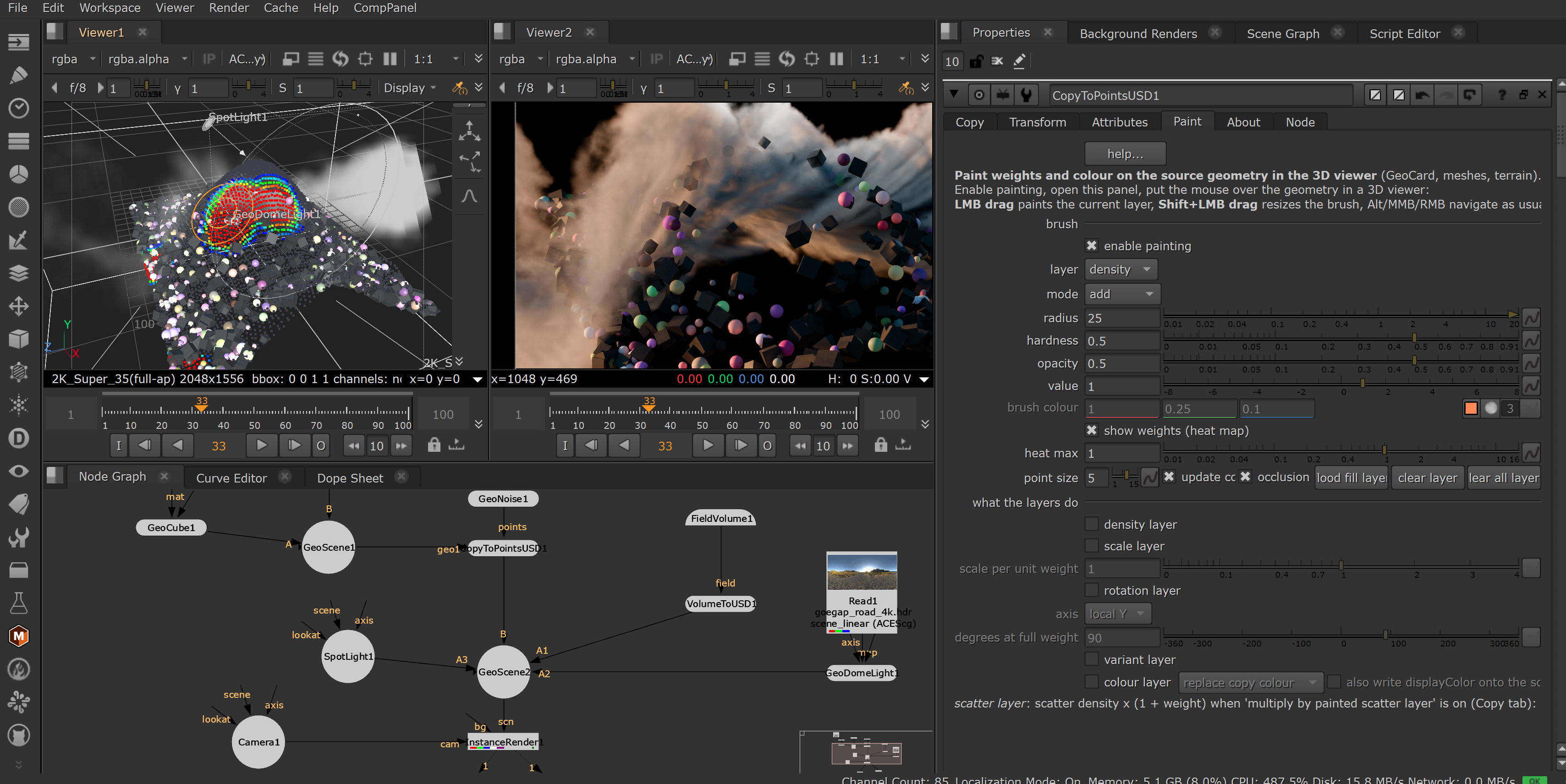
InstanceRender is a path tracer for Nuke that renders USD and Classic 3D scenes with true instancing. Each UsdGeomPointInstancer or instanceable prim is stored once as a prototype with a list of transforms, so memory stays low no matter how many copies are in the scene.
What's New in 0.20.1
Installation is now much simpler. Copy a single folder into .nuke and add two lines to init.py. There are no longer any DLLs to copy manually. The renderer itself is unchanged from 0.20.0.
Highlights
CPU rendering with Embree 4 and GPU rendering with OptiX, sharing the same shading kernel for consistent results.
Native support for Nuke's USD and Classic 3D systems.
True instancing through the BVH, including motion-blurred instances.
USD materials, lights, cameras and textures.
OpenVDB volumes with absorption, scattering, self-shadowing and emission.
Catmull-Clark and bilinear subdivision, with crease support.
Points, curves and analytic primitives.
Nuke particles rendered as instanced spheres.
Per-instance colour, opacity and material overrides.
Cryptomatte by object, material and individual instance.
A full set of AOVs: depth, normals, motion vectors, IDs, albedo, position, shadows and light groups.
Deep output, including volume depth segments.
Progressive refinement in the Viewer.
Hydra render delegate for Nuke 17.0 and 17.1, with instancing preserved.
Lighting & Volumes
Supports dome, distant, point/sphere, rectangle, disk and cylinder lights, with ShapingAPI controls and IES profiles.
Volumes support temperature-driven blackbody emission, intensity-based emission, multiple scattering, self-shadowing and emissive grids.
Noise Control
Radiance clamping helps suppress fireflies, and the OptiX AI denoiser uses albedo and normal passes for clean results at lower sample counts.
Compatibility
Nuke 14.1, 15.2, 16.0, 16.1, 17.0 and 17.1 on Windows 64-bit.
USD scene input requires Nuke 16.0 or later; earlier versions use the Classic 3D workflow. A single download covers all supported versions: the plugin includes a build for each Nuke release and loads the correct one automatically at startup.
Installation
Copy the
InstanceRenderfolder from the zip into your.nukefolder. To open it quickly, press Windows + R, type%USERPROFILE%\.nukeand press Enter.Open
.nuke\init.pyin a text editor (create it if it doesn't exist) and add:
import nuke
nuke.pluginAddPath('./InstanceRender')
If the file already contains other lines, add these at the end rather than replacing anything.
Restart Nuke. You'll find the node under 3D > InstanceRender, or via Tab > InstanceRender.
Prefer an automatic install? Run the included install.bat. Step-by-step instructions are provided in QUICK_INSTALL.md.
Hydra Viewer support (Nuke 17.0/17.1): to select InstanceRender from the Viewer's renderer menu, launch Nuke using the supplied hydra_launch.bat, or set the PXR_PLUGINPATH_NAME environment variable. This is only needed for the Viewer; the InstanceRender node works without it.
Not Yet Supported
Light filters and portals.
Textured displacement.
See Also
CopyToPoints — companion instancing and scattering tools for feeding geometry, particles and volumes into InstanceRender.
Open Source
MIT License
Copyright (c) 2026 Marten Blumen
Permission is hereby granted, free of charge, to any person obtaining a copy
of this software and associated documentation files (the "Software"), to deal
in the Software without restriction, including without limitation the rights
to use, copy, modify, merge, publish, distribute, sublicense, and/or sell
copies of the Software, and to permit persons to whom the Software is
furnished to do so, subject to the following conditions:
The above copyright notice and this permission notice shall be included in all
copies or substantial portions of the Software.
THE SOFTWARE IS PROVIDED "AS IS", WITHOUT WARRANTY OF ANY KIND, EXPRESS OR
IMPLIED, INCLUDING BUT NOT LIMITED TO THE WARRANTIES OF MERCHANTABILITY,
FITNESS FOR A PARTICULAR PURPOSE AND NONINFRINGEMENT. IN NO EVENT SHALL THE
AUTHORS OR COPYRIGHT HOLDERS BE LIABLE FOR ANY CLAIM, DAMAGES OR OTHER
LIABILITY, WHETHER IN AN ACTION OF CONTRACT, TORT OR OTHERWISE, ARISING FROM,
OUT OF OR IN CONNECTION WITH THE SOFTWARE OR THE USE OR OTHER DEALINGS IN THE
SOFTWARE.
or register to download or rate.
Comments