Node to clean CG renders in three stages: Firefly, Deflicker and Denoise.
CleanPass
First submitted: 11 November 2026
Author: Gabin vidal
Website: https://gabinvidal.com/
Compatible Nuke versions: 16.0 or later
Compatibility: Windows

CleanPass is a compiled (NDK) Nuke node that cleans path-traced renders in three stages, each in its own tab with its own enable switch.
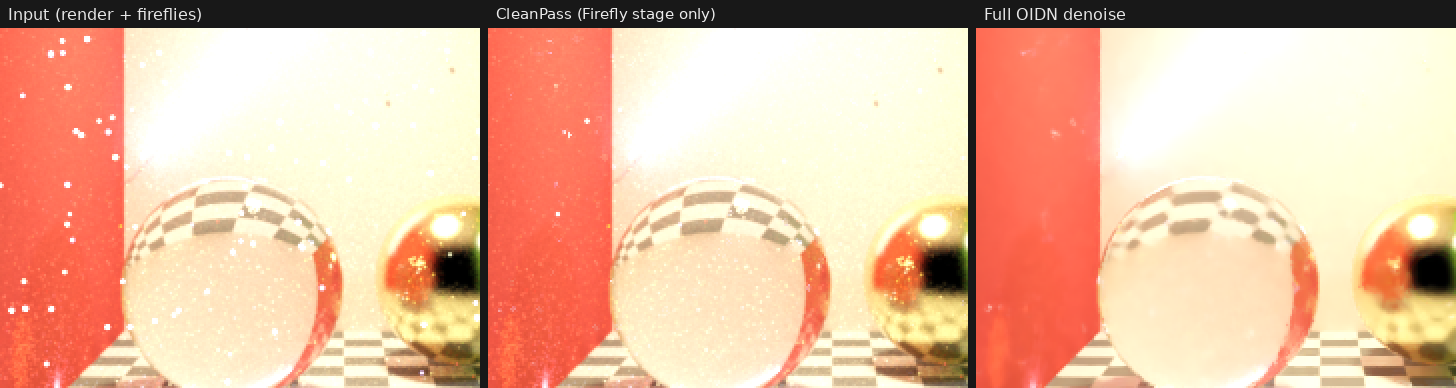
**Firefly** — finds the outlier pixels against an expected value (an OIDN prediction guided by albedo and normal, or a fast statistical estimate), with a threshold that adapts to the local noise and a temporal check against t-1 / t+1 that protects real small highlights. Only the fireflies are corrected: every other pixel comes out untouched. Where fireflies are so dense that they are the light itself (low sample counts), their energy is given back as a smooth field, so the image keeps its brightness.
**Deflicker** — every pixel is matched in the neighbouring frames (guided by albedo / normal, plus the renderer's motion vectors and depth when present) and averaged only with samples of the same surface and the same light. No ghosting: occlusions, moving shadows and lights switching on or off are never blended in.
**Denoise** — Intel Open Image Denoise 2.5 (HDR, CPU or CUDA), guided by albedo and normal. Stabilise over time: t-1 and t+1 go through the same chain and are blended in where they agree, which removes the boiling of a per-frame denoiser. When rendering in order, each frame reuses the work prepared by the previous one.
**Highlights**
- Light groups / AOVs picked from a list: every stage applies to them, and they still add up exactly to the cleaned beauty.
- Passes from a multi-layer EXR, or from their own inputs (albedo, normal, motion, depth).
- Motion vector convention found automatically by checking them against the image.
- Animated or fixed render seed, NaN / inf repair, firefly matte, diagnostic views, mask input, mix.
- Validated against converged references on Arnold and Mitsuba sequences (moving camera, glass, chrome, a blinking light, fog, hair, depth of field, motion blur): on a 1080p Arnold shot at AA 2, 2.3× steadier than OIDN alone on flat areas, with the light of the render kept.
**Install** — close Nuke, unzip, run install.bat. In Nuke: Filter > CleanPass, or Tab-search "CleanPass". Full documentation in the README.
The first install downloads the Open Image Denoise runtime (about 45 MB, too large for Nukepedia) from the GitHub release. The complete package is also there: https://github.com/gabinvidal/CleanPass/releases
**Compatibility** — Windows x64, Nuke 16 and 17 (one build per version included). Optional NVIDIA GPU for CUDA.
Source code and documentation: https://github.com/gabinvidal/CleanPass
Created by Gabin Vidal — https://www.linkedin.com/in/gabinvidal
MIT — free to use, modify and share. Bundles Intel Open Image Denoise 2.5 (Apache 2.0), see THIRD_PARTY_NOTICES.md.
or register to download or rate.
Comments