ah_KeyerRGB – RGB keyer for Nuke, inspired by the Keyer RGB in Autodesk Flame Keys directly on the Red, Green and Blue channels. Please check ah_KeyerYUV and ah-KeyerHSL
RGB Keyer like Flame
First submitted: 27 October 2026
Author: Andreas Hindrichkeit
Website: https://andreas-hindrichkeit.de
Compatible Nuke versions: 16.0 or later
Compatibility: Source
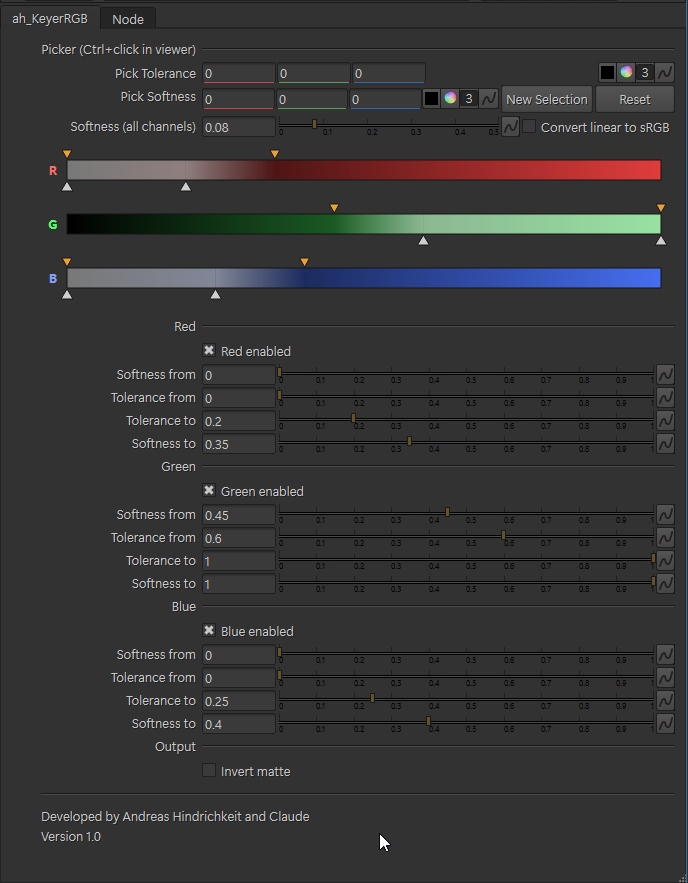
ah_KeyerRGB – RGB keyer for Nuke, inspired by the Keyer RGB in Autodesk Flame Keys directly on the Red, Green and Blue channels. Input is RGB, output is RGBA: the original RGB stays untouched and only the alpha channel is added (alpha = 1 - matte, so keyed pixels become fully transparent).
Features:
Flame-style range bars for R, G and B (black to red / green / blue) with draggable markers: tolerance markers below the bar, softness markers above it, keyed range highlighted
Four markers per channel (softness from / tolerance from / tolerance to / softness to) with a linear falloff, also editable via sliders
"Pick Tolerance" and "Pick Softness" color pickers: the first pick sets the range, further picks extend it.
Option to start a new selection
Global "Softness (all channels)" slider
Per-channel on/off and "Invert matte"
Optional linear-to-sRGB conversion before keying
No extra channels or compiled plugins needed
Installation:
Copy the ah_KeyerRGB folder to your ~/.nuke directory and add this line to init.py: nuke.pluginAddPath("./ah_KeyerRGB") Restart Nuke. The tool appears under Nodes > Keyer > ah_KeyerRGB.
Developed for Nuke 16/17 (PySide6).
Developed by Andreas Hindrichkeit and Claude.
or register to download or rate.
Comments