Kadatha - File Browser

Kadatha - File Browser for Nuke

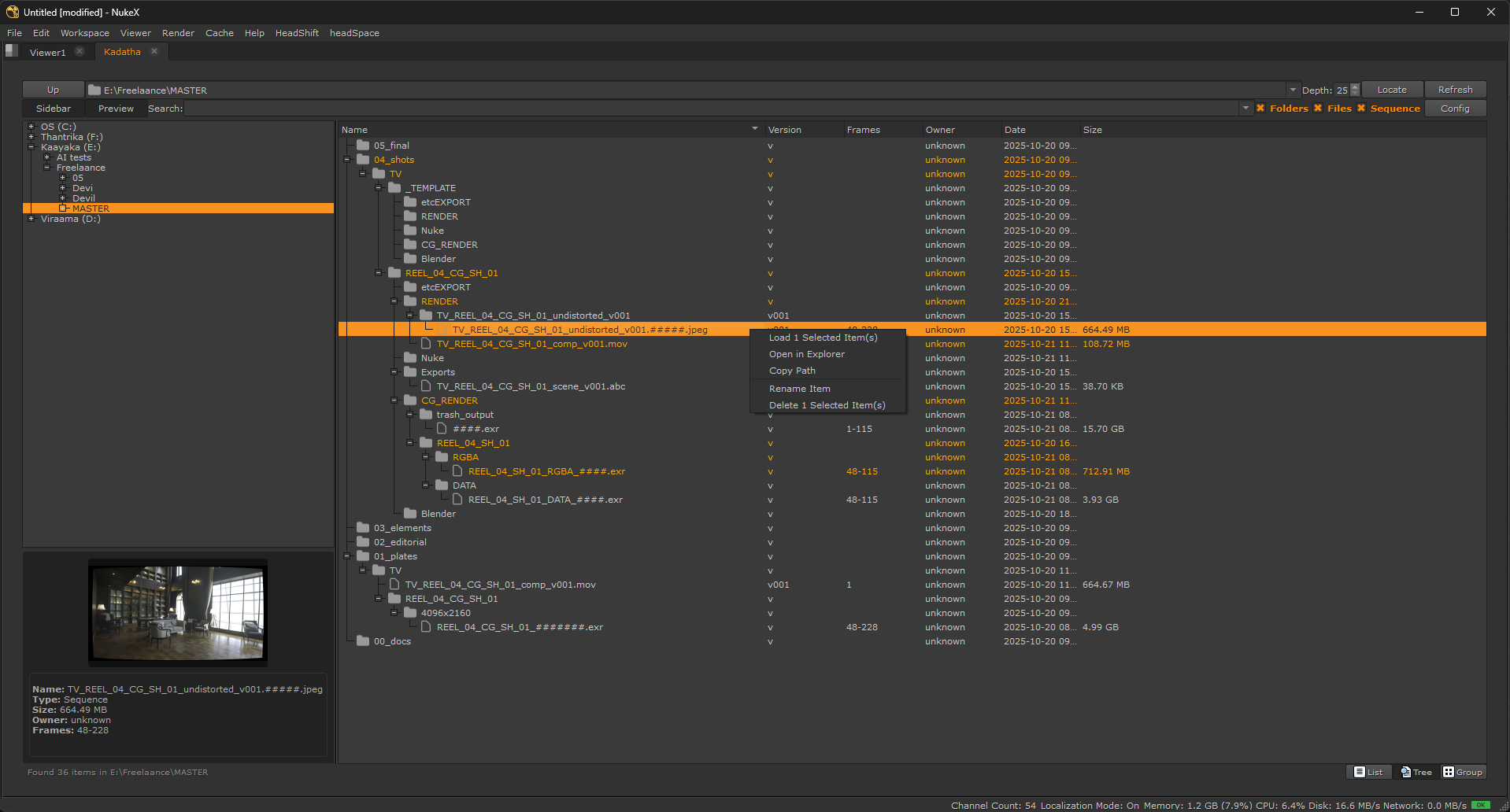
Kadatha is a file browser for Nuke designed to streamline asset management. It allows users to scan specific directories, search files and manage assets efficiently.

ಕಡತ (Kaḍata) In Kannada, primarily means a file, document, or record, commonly used in administrative or office contexts.

First submitted: 16 May 2026

Author: Prasannakumar T Bhat

Website: http://pramotions.weebly.com/

Compatible Nuke versions: 15.0 or later

Compatibility: Source

Installation Guide

1. Prerequisites

  • Ensure Nuke is installed (version 15 or higher).

2. Download and instal Kadatha

  • Download from [repository link] and place the kadatha in nuke path

  • add folder path in init.py

  • Restart Nuke.

3. First Use

  • Launch Kadatha via File > viewer > Kadatha.

  • It will launch panel


Configuration

1. File Extensions

  • It will scan for the mentioned file formats only

  • Preffilled basic file types, can be extended.

2. Ignore Directories

  • Skip unwanted files and folders (e.g., .git thumbs.db etc.).

3. single files

  • Exclude file extensions from loading as sequences

3. Search Depth

  • Control how deep Kadacha explores subfolders.

  • It can be heavy to load multiple subfolders, max set to 25

3. Threads

  • How meny CPU threads can be used for scaning the files (more is faster load time)

4. File mutations

  • Delete and rename file sequences and folders

  • Shows in right click context menu only if enabled.

description

Usage

1. Scanning a Directory

  1. Set the path in the top bar. or click locate to autofill path from selected file knob (if nothing is selected it will fill current script path)

  2. Click Refresh or hit enter to start scanning.

  3. View can be toggled list, tree and group mode.

  4. Double click to load it in the dag or use right click context menu for more options.

2. Preview Files

  • Selected file will show in preview window (curently only web formats supported, jpg,png etc)

3. Search

  • Search for files or folder with keywords. + will act as AND, space will act as OR, - will act as exclude.

  • ex: comp+v001 -precomp will search for files and folders containing comp and v001 and exlude the results with precomp.

  • ex: comp roto prep will list all the items with the only keywords (may not be in the same file name)

  • Search can be filtered more by togling file and folder checkboxes

  • Assets used in the curently opened script will be highlighted

4. Rename

  • Enter new name without padding and extension, it will rename entire sequence keeping the fame number and extension

  • New name with padding will change pading ( if you need to rename from ### to #####)

5. Faverites and history

  • Right click > add to faverites : it will add a button below search bar for quick acsess, also listed in the dropdown of file path bar.

  • It will remember folder navigation history and faverites are listed first. ( as per config )

  • Hitting enter in the search bar will remember search terms for future use. ( it will process in real time only saves on enter)

  • Everything is distingused by icons

6. Right click context menu

  • Load item : mimics the drag and drop from windows explorer

  • Open in explorer : opens selected item in windows file manager

  • Copy path : copy selected item path without quotes ( list if multiple items are selected)

  • Rename item * : rename sequences

  • Delete item * : delete files and folders

Apache License 2.0

Permission is hereby granted, free of charge, to any person obtaining a copy of this software and associated documentation files (the "Software"), to deal in the Software without restriction, including without limitation the rights to use, copy, modify, merge, publish, distribute, sublicense, and/or sell copies of the Software, and to permit persons to whom the Software is furnished to do so, subject to the following conditions:

The above copyright notice and this permission notice shall be included in all copies or substantial portions of the Software.

THE SOFTWARE IS PROVIDED "AS IS", WITHOUT WARRANTY OF ANY KIND, EXPRESS OR IMPLIED, INCLUDING BUT NOT LIMITED TO WARRANTIES OF MERCHANTABILITY, FITNESS FOR A PARTICULAR PURPOSE AND NONINFRINGEMENT. IN NO EVENT SHALL THE AUTHORS OR COPYRIGHT HOLDERS BE LIABLE FOR ANY CLAIM, DAMAGES OR OTHER LIABILITY, WHETHER IN AN ACTION OF CONTRACT, TORT OR OTHERWISE, ARISING FROM, OUT OF OR IN CONNECTION WITH THE SOFTWARE OR THE USE OR OTHER DEALINGS IN THE SOFTWARE.
or register to download or rate.

Comments

or register to join the conversation.

Download Verification