Local AI matte selection, tracking and refinement for Nuke. Artist corrections, live previews and work-range alpha export. Free Windows beta.
ROTONIX — AI Matte Assistant (Public Beta 1)
First submitted: 6 October 2026
Author: Bishal Pandit
Compatible Nuke versions: 15.0 or later
Compatibility: Windows
About ROTONIX
ROTONIX is a free public beta AI matte assistant for Foundry Nuke, created by Bishal Pandit. It brings subject selection, tracking, artist corrections and matte refinement into one Nuke panel. The recommended models are selected automatically, so you can start with footage and guidance points instead of configuring the AI pipeline.
This beta is being released to gather feedback from the VFX community. Output quality and performance depend on your footage, hardware and corrections. Review the full matte before using it in a shot.
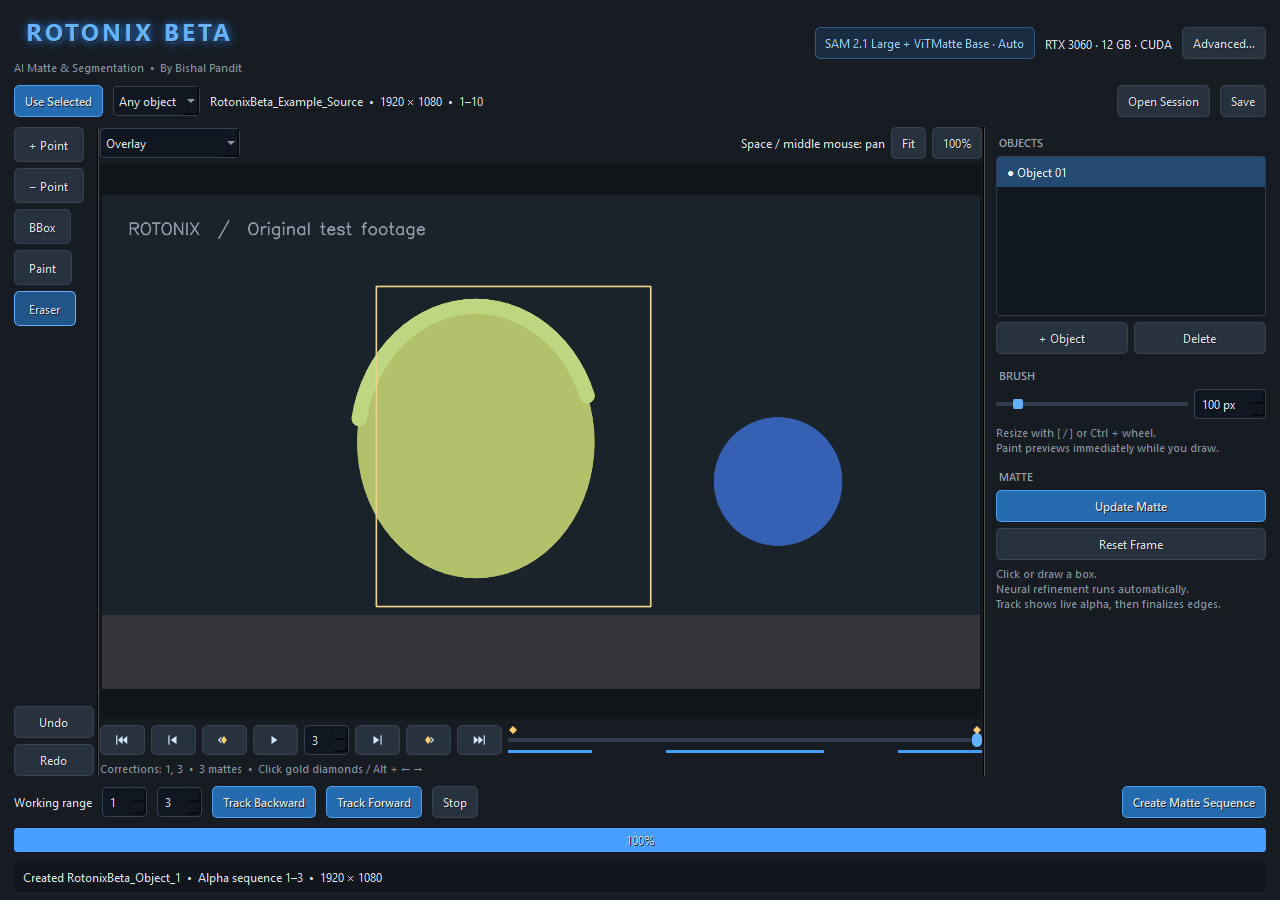
Interface preview using original synthetic test footage. This illustrates the controls rather than hair or production-shot quality.
Features
SAM 2.1 Large segmentation with ViTMatte Base refinement by default.
Native-resolution edge refinement and RAFT-based temporal stabilization.
Positive/negative points, bounding boxes, paint and eraser; separate objects.
Zoom and pan, visible adjustable brushes, and premultiplied RGBA preview.
Forward/backward tracking with live previews and correction-frame jumps.
Timeline playback and a defined working frame range.
Source caching reused across editing and tracking.
Export the completed work range as an alpha matte sequence through one Nuke Read node.
Local processing: footage is not uploaded; no automatic analytics.
Install
Download and extract ROTONIX-BETA-2.0.0b1-Nukepedia.zip.
Save your work and close Nuke. Run ROTONIX-BETA-2.0.0b1-Setup.exe from the extracted folder.
Read and accept the beta terms and privacy/download policy. Keep Automatic NVIDIA GPU and the default Nuke startup folder unless your studio uses a custom folder.
Let AI preparation finish. First-time setup downloads several GB of software and model weights; the default models require no account. Wait until the window says “Your AI engine is ready.”
Restart Nuke and open ROTONIX BETA → AI Matte Assistant.
The installer uses a private Python runtime and a separate beta menu. It does not replace your system Python or Nuke's Python. The complete illustrated guide is included at docs/USER_GUIDE.html and is also available from the Windows Start menu.
Create your first matte
Select a Read node or an image-producing node, then click Use Selected.
Set the working frame range. Start with a short range to check the shot.
Place a positive point on the subject. Add negative points or a bounding box to exclude unwanted areas, then update the matte.
Track forward and/or backward. Inspect the alpha, add corrections on difficult frames, and track again where needed.
Wait for final edge stabilization. Live previews are provisional.
Click Create Matte Sequence and choose a durable output folder. Only your set work range is exported as a sequence through one Nuke Read node.
Mouse wheel: zoom. Middle mouse or Space + drag: pan. Ctrl + wheel or [ / ]: brush size. Alt + Left / Right: correction-frame jumps.
Compatibility and requirements
Windows 10/11 x64 only; Windows 11 recommended. Nuke 15.0–17.1 is the compatibility target. Actual Nuke workflow tests passed on 17.0v2 and 17.1v1. Qt 5 controls were tested separately; Nuke 15/16 hosts still need beta-user validation.
NVIDIA CUDA GPU with at least 8 GB VRAM recommended; 12 GB+ VRAM and 32 GB RAM preferred. Use a current NVIDIA driver and an SSD. Allow at least 15 GB free for AI setup, plus additional space for footage and matte caches. CPU fallback is available but much slower. AMD/Intel GPUs use CPU in this release. Nuke and the NVIDIA driver are installed separately.
First-time setup requires internet. Once the default components are installed, matte processing is local. Optional SAM 3.1 requires approved Hugging Face access and acceptance of its separate model terms; it is not required for normal use.
Beta notes and repair
This is version 2.0.0 beta 1, including the 6 October 2026 fix for intermittent Windows progress-file access errors. The current installer and its progress window were verified on the development PC with RTX 3060 GPU segmentation/refinement.
If setup is interrupted, keep the installation and use Start menu → ROTONIX BETA → Repair setup. Verified components are reused, and partial downloads resume where supported. Logs are stored locally in the installation's logs folder.
The installer is unsigned, so Windows may show Unknown publisher or SmartScreen. The supplied SHA-256 file identifies this release. This beta does not guarantee production fitness or consistent results on every shot/hardware configuration.
Your feedback will shape the next version
Please try ROTONIX on your own permitted test shots and leave your valuable feedback in this listing's comments. Suggestions from compositors and roto artists will help guide quality, speed, usability and compatibility improvements.
For useful bug reports, include:
ROTONIX and Nuke versions; Windows version; GPU, VRAM and driver.
Footage resolution, frame count and working range.
Steps to reproduce, and what you expected versus what happened.
Whether the issue appears in the live preview, final alpha, export or installation.
Short permitted examples and before/after alpha comparisons are welcome. Review logs before sharing and remove confidential paths, account details and tokens. Please do not post confidential production footage.
License and credits
ROTONIX application code is MIT licensed. Third-party software and model weights retain their respective terms; the included LICENSE, beta terms and docs/THIRD_PARTY.html provide the notices and upstream references. The public beta excludes the non-commercial MatAnyone 2 research weights.
ROTONIX is an independent project by Bishal Pandit. It is not endorsed by Foundry, Meta or Nukepedia.
MIT License
Copyright (c) 2026 Bishal Pandit
Permission is hereby granted, free of charge, to any person obtaining a copy of this software and associated documentation files (the "Software"), to deal in the Software without restriction, including without limitation the rights to use, copy, modify, merge, publish, distribute, sublicense, and/or sell copies of the Software, and to permit persons to whom the Software is furnished to do so, subject to the following conditions:
The above copyright notice and this permission notice shall be included in all copies or substantial portions of the Software.
THE SOFTWARE IS PROVIDED "AS IS", WITHOUT WARRANTY OF ANY KIND, EXPRESS OR IMPLIED, INCLUDING BUT NOT LIMITED TO THE WARRANTIES OF MERCHANTABILITY, FITNESS FOR A PARTICULAR PURPOSE AND NONINFRINGEMENT. IN NO EVENT SHALL THE AUTHORS OR COPYRIGHT HOLDERS BE LIABLE FOR ANY CLAIM, DAMAGES OR OTHER LIABILITY, WHETHER IN AN ACTION OF CONTRACT, TORT OR OTHERWISE, ARISING FROM, OUT OF OR IN CONNECTION WITH THE SOFTWARE OR THE USE OR OTHER DEALINGS IN THE SOFTWARE.
Third-party dependencies and model weights retain their own licenses. See docs/THIRD_PARTY.html and the included beta terms.
or register to download or rate.
Comments