Point-guided multi-object roto in Nuke. Track and correct mattes, refine edges with ViTMatte, then use alpha for compositing.
SAM Roto for Nuke
First submitted: 4 October 2026
Author: kota mori
Website: https://github.com/MoriKouta/SAM-Roto-for-Nuke-Releases/releases/tag/v1.0.0
Compatible Nuke versions: All
Compatibility: Linux, Windows
SAM Roto for Nuke v1.0.0
The Nukepedia attachment is a small online installer for SAM Roto for Nuke v1.0.0. It downloads the fixed official release ZIP from GitHub over HTTPS, checks its pinned SHA-256 and safely extracts it before opening the existing installer. Internet access is required.
Extract the attached online-installer ZIP into a new folder. Windows: double-click install_windows.bat. Linux x86_64: open that folder in a terminal and run sh install_linux.sh.
To download the complete package manually, open the Release link, expand Assets if needed, and choose SAM-Roto-for-Nuke-v1.0.0.zip. GitHub Source code (zip) and Source code (tar.gz) are not the installer package. Full Setup still needs Internet access to prepare its dependencies and models.
Turn a few guidance points into separate object mattes without leaving Nuke. Track subjects through the shot, correct difficult frames, refine edges with optional ViTMatte, and use the resulting alpha in your composite.
Quick setup: extract the small attached ZIP, save your work and close Nuke/backend, then run install_windows.bat or sh install_linux.sh. Wait for the official ZIP download, verification and extraction. Choose Install SAM Roto, let Full Setup finish, click Finish, and restart Nuke. Python/PyTorch, SAM 2/2.1 Base+ and ViTMatte models are prepared by Full Setup; no system Python, Git or startup editing is required.
1. SELECT YOUR SUBJECTS
Select the source node and choose SAM Roto > Open SAM Roto. Start with Full Range, Local Cache and Auto Source Color, then click Prepare Source. Choose an Object and add foreground points with Add Point. Use Remove Point for background/exclusion guidance, and Undo Point to reverse a point edit. Create another Object to keep subjects in separate mattes.
The example below selects two cats as separate red and yellow objects on frame 1.
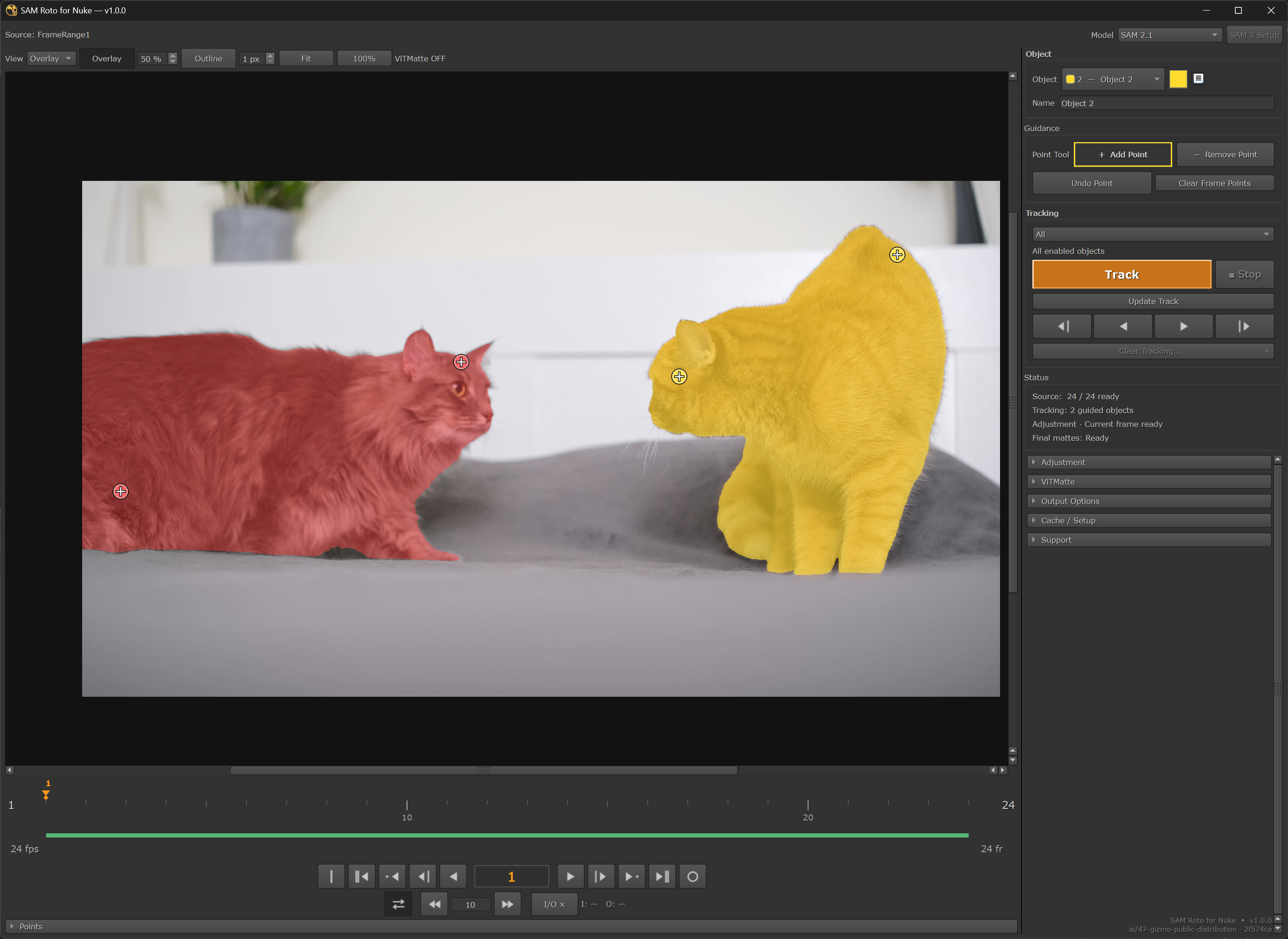
Select: two separate object mattes with guidance points on frame 1. v1.0.0 development checkout.
2. TRACK AND CORRECT
Set the In-Out range and click Track to fill unfinished frames. Scrub the result. Add foreground/background correction points at difficult frames, then use Update Track to recompute the affected range. Stop keeps completed frames.
The example shows both object overlays on frame 24; the interface reports 24 tracked frames completed.
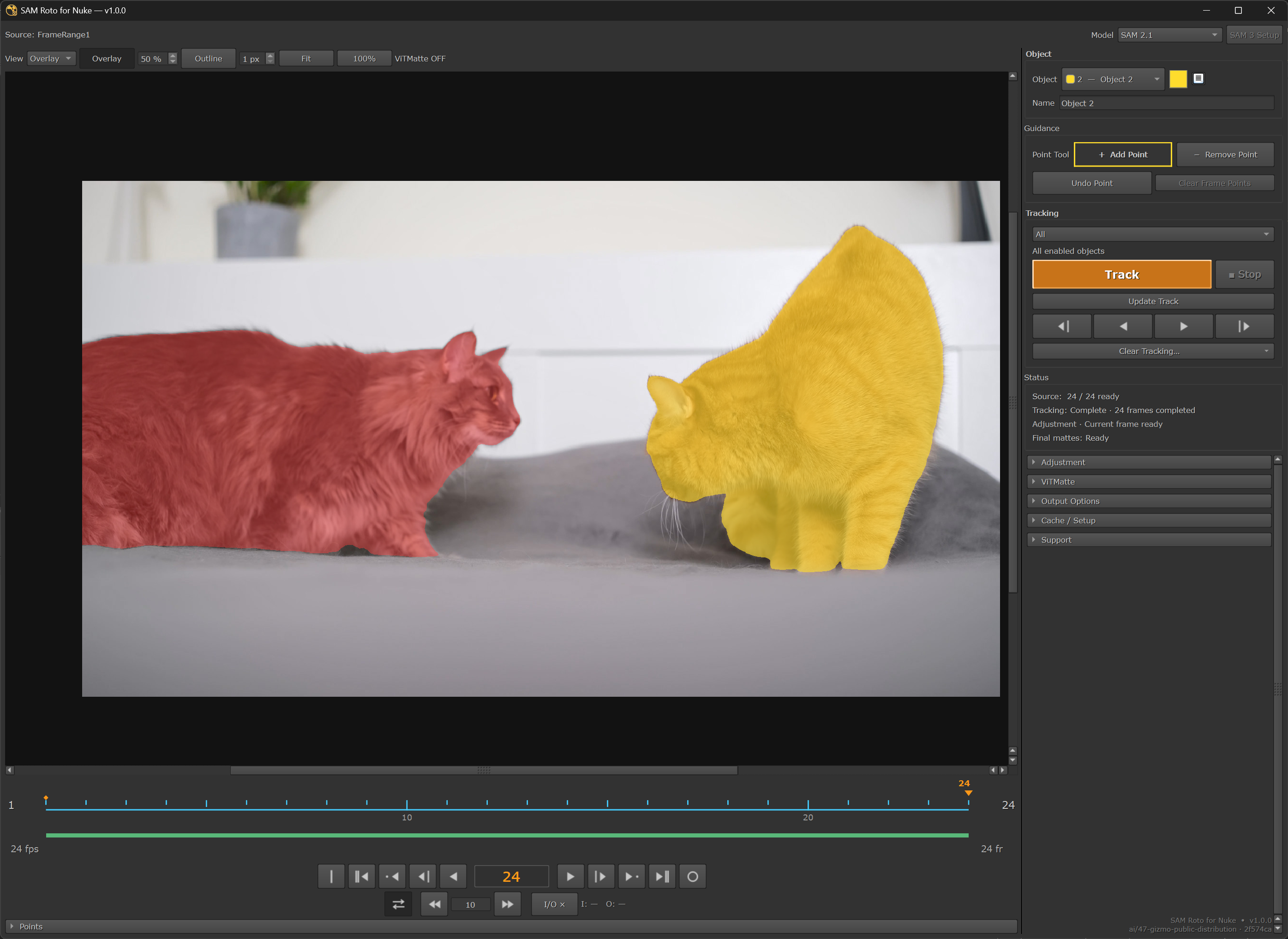
Track: two object overlays on frame 24, with 24 tracked frames reported complete. v1.0.0 development checkout.
3. COMPARE VITMATTE OFF / ON
Switch to Matte View to inspect the alpha. The two screenshots show the same frame 24 with ViTMatte disabled and enabled. Compare the fur and outline detail, then choose the refinement settings that suit your shot. ViTMatte is optional edge refinement, uses additional GPU resources, and is not a tracking model.
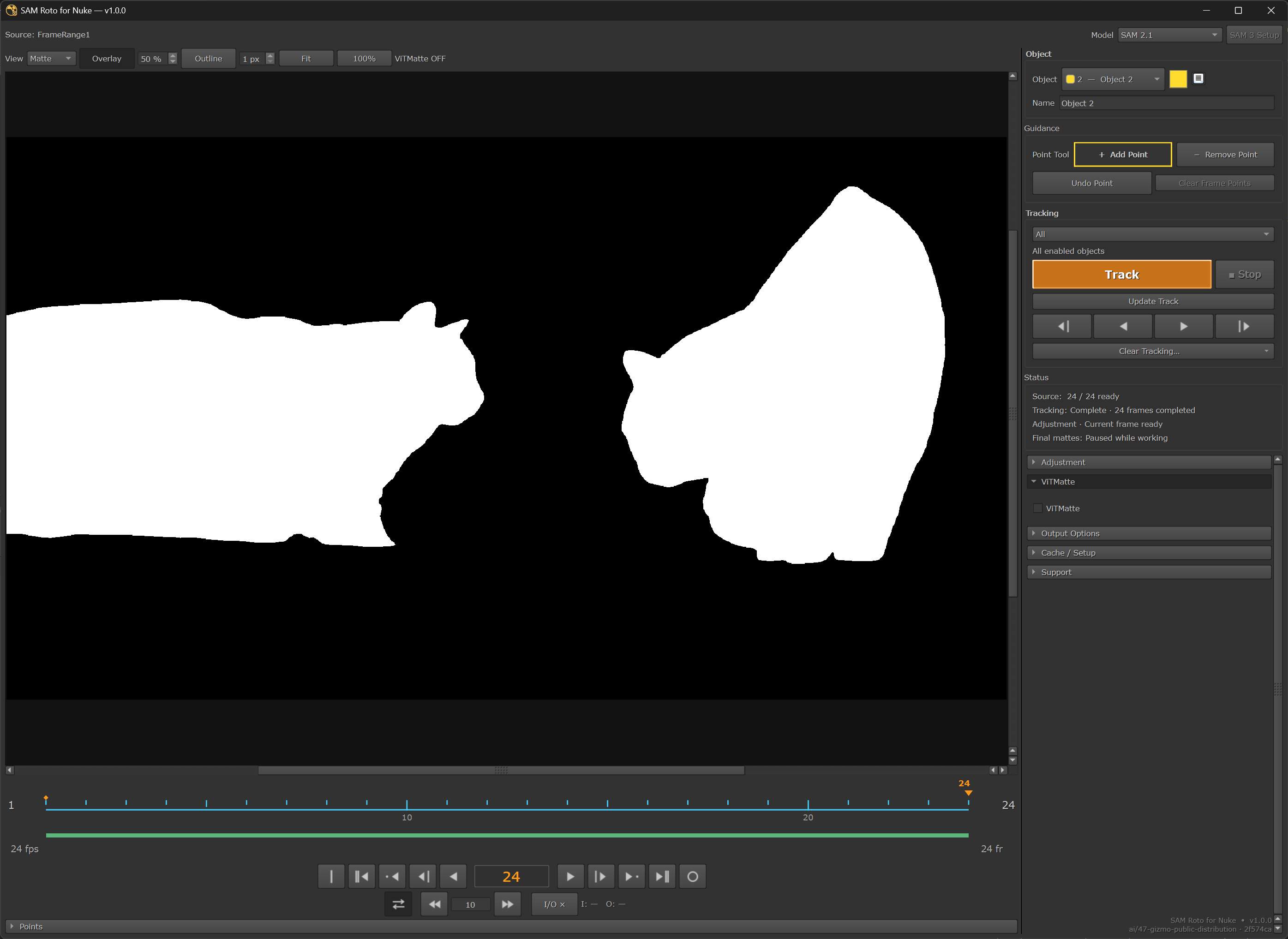
ViTMatte OFF: Matte View on frame 24. v1.0.0 development checkout.
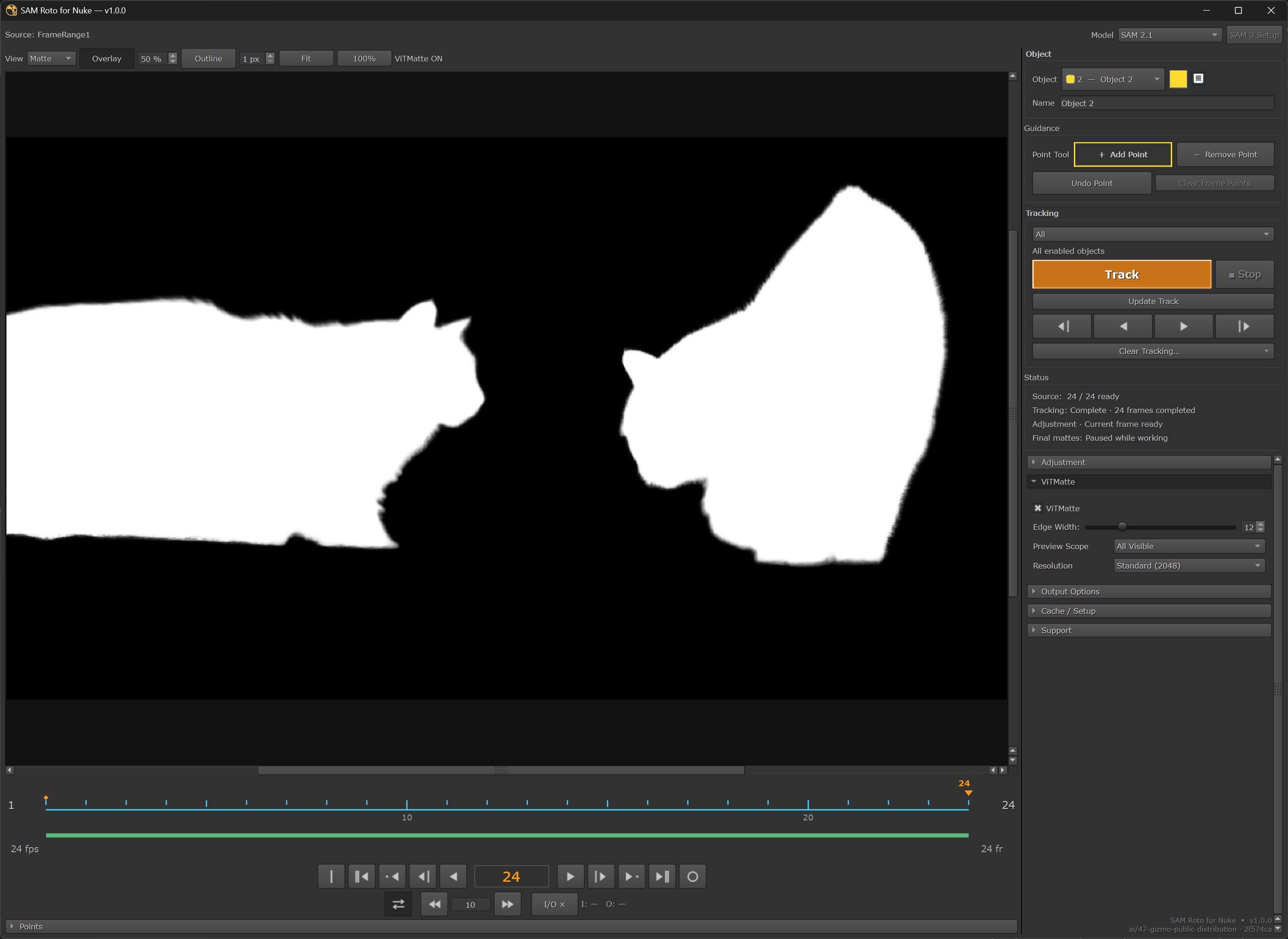
ViTMatte ON: Matte View on the same frame 24. v1.0.0 development checkout.
4. PREVIEW THE CUTOUT AND USE YOUR MATTE
Switch to Cutout View to preview the subjects against black. In Nuke, inspect rgba.alpha and use the SAM Roto Group in your composite. Connect a Write for GUI rendering; required Final Mattes prepare before the render continues. For a separate object output, use Node Properties > Output > Object Matte.
The image below is a current-frame Cutout preview. It does not document a completed full-range Final Matte preparation or Write render.
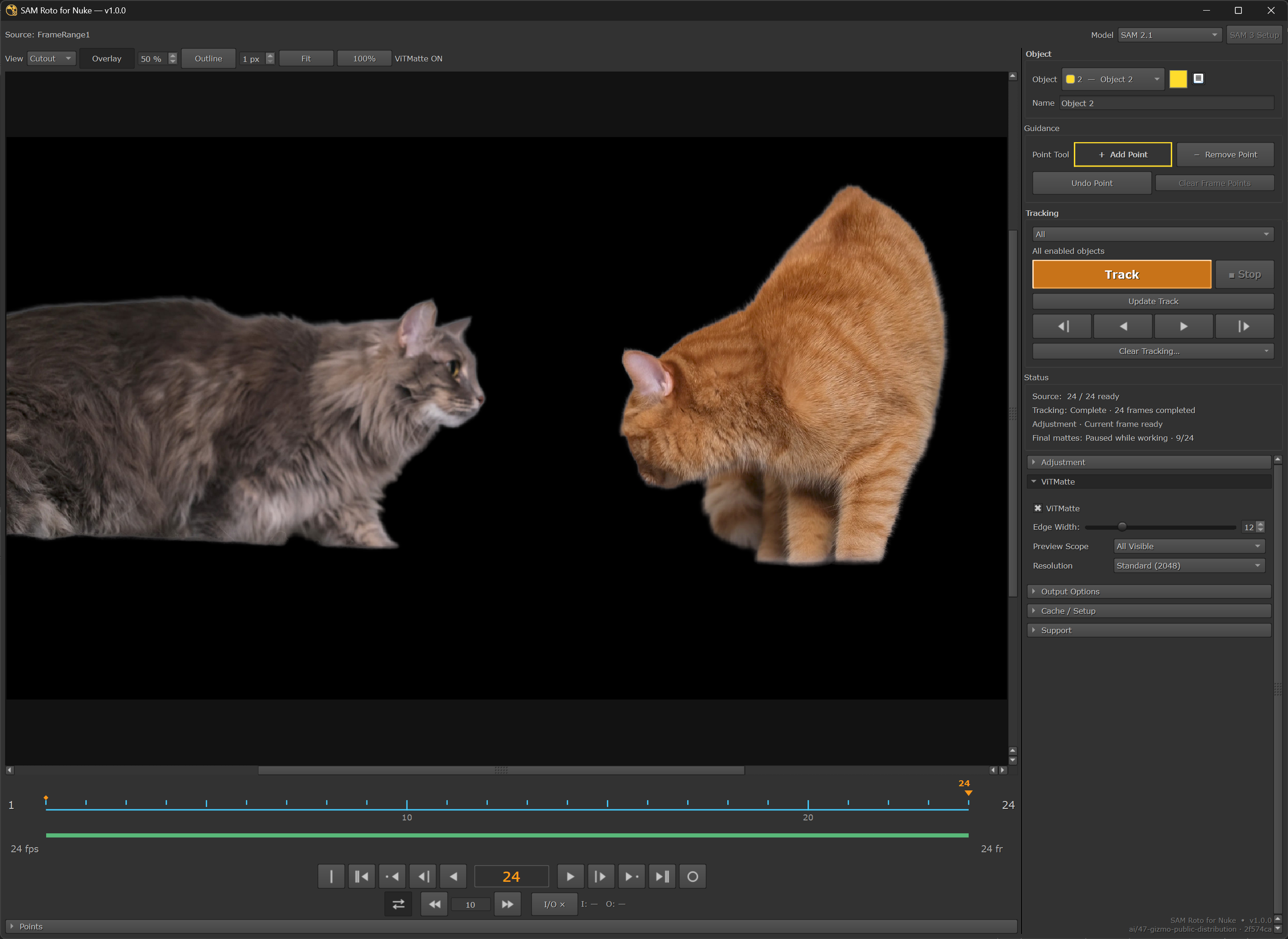
Cutout: current-frame preview on frame 24. Final Matte preparation is paused at 9/24. v1.0.0 development checkout; not a completed Write render.
DOWNLOAD AND GUIDES
Official GitHub Release: installer ZIP and updates:
https://github.com/MoriKouta/SAM-Roto-for-Nuke-Releases/releases/tag/v1.0.0
English illustrated install / first-matte guide:
https://github.com/MoriKouta/SAM-Roto-for-Nuke-Releases/blob/release/docs/QUICKSTART_EN.md
Japanese illustrated guide:
https://github.com/MoriKouta/SAM-Roto-for-Nuke-Releases/blob/release/docs/QUICKSTART_JA.md
REQUIREMENTS AND LIMITATIONS
Windows / Linux x86_64 and an NVIDIA CUDA-capable GPU are required. Internet is needed for installation/repair. Allow 20 GB free during standard setup, plus shot caches. Nuke 15.2 / 16.0 / 16.1 / 17.x are compatibility targets; validation is not complete for every OS/Nuke/GPU combination. macOS and CPU-only / AMD-only / Intel-only inference are unsupported.
The online launcher needs existing Windows PowerShell 5.1 / .NET 4.7.2 or later on Windows, or curl, unzip and core Perl (Digest::SHA, JSON::PP, Fcntl) plus ordinary shell utilities on Linux. It does not install missing OS tools. If these tools are unavailable, download the complete official ZIP manually. The small attachment does not bundle the SAM application, Python, uv or model weights.
Windows SAM3/3.1 is unavailable. Linux SAM3/3.1 is experimental and needs installer Advanced plus approved Hugging Face access. Farm/terminal rendering needs prepared caches/runtime or baked standard nodes. Get Color and the custom Ctrl+Shift+C hotkey are not included.
For updates, save work, close Nuke/backend and run the new approved installer. Compatible runtime/models and artist data are preserved. Use Repair for incomplete components and Support > Logs / Copy Diagnostics for backend problems. Do not install over a normal development profile.
ABOUT THESE SCREENSHOTS
User-provided workflow examples captured in a development checkout displaying v1.0.0 (branch ai/47-gizmo-public-distribution, commit 2f574ca). They illustrate the controls and visible results; they are not fresh native-acceptance or Write-render evidence for the published ZIP.
LICENSE
Original SAM Roto code is MIT. Third-party dependencies and model weights retain their own terms; see LICENSE and THIRD_PARTY_NOTICES.md in the ZIP and public repository.
Original SAM Roto code: MIT. Bundled dependencies and model weights retain their respective licenses. See LICENSE and THIRD_PARTY_NOTICES.md in the ZIP and public GitHub repository.
or register to download or rate.
Comments