Run ComfyUI workflows on your plates from inside Nuke, locally or on Comfy Cloud. Results come back scene-linear, lined up with the plate.
ComfyBridge
First submitted: 12 November 2026
Author: David Borrull
Website: https://github.com/dborrull/nuke-comfybridge
Compatible Nuke versions: 17.0 or later
Compatibility: Source
ComfyBridge v0.11.2 (Nukepedia's version field starts at 1.0.0; the real version is the one on GitHub and in the zip name).
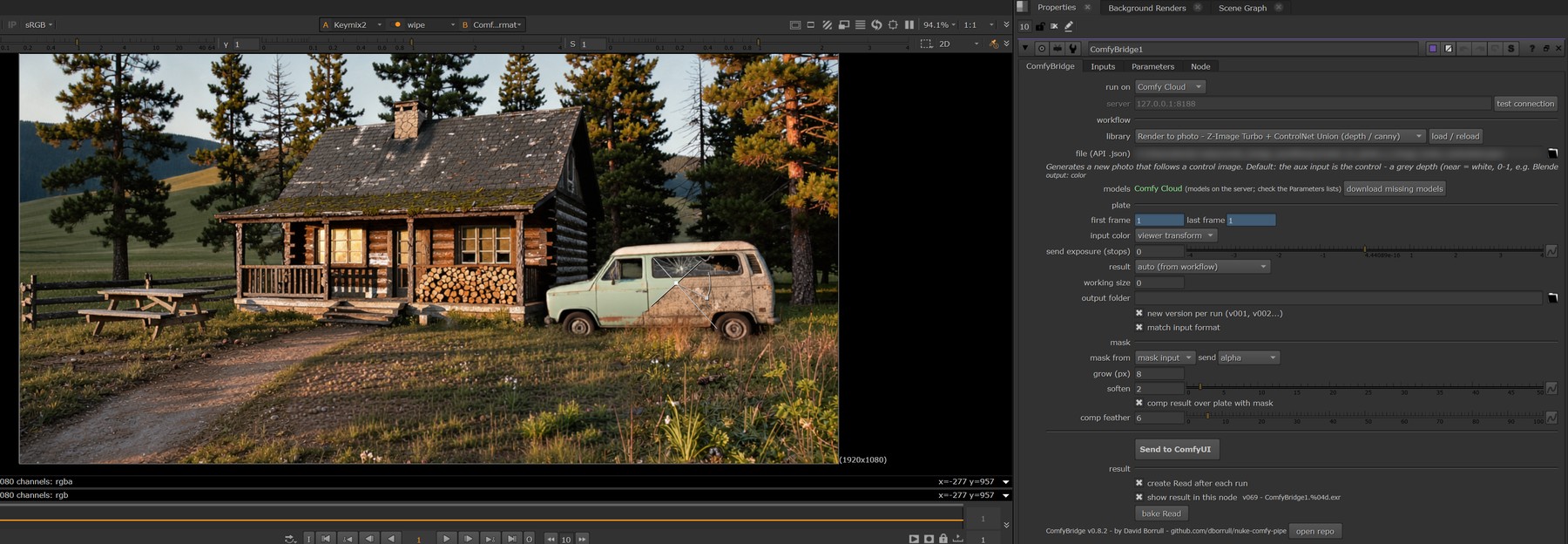
ComfyBridge runs ComfyUI workflows on your plates from inside Nuke, on your own GPU or on Comfy Cloud. Select a plate, pick a workflow (depth, relight, inpaint, upscale, video matte, your own...), tweak its knobs and press run: the result comes back next to the node, scene-linear and lined up with the plate. One machine is enough: no shared folders, no render farm setup.
What It Does
The model sees what you see. Diffusion models are trained on display images, not scene-linear EXRs. ComfyBridge sends the plate through your active Viewer transform (OCIO display / view, ACES included, or Nuke's LUTs) and runs colour results through the inverse, so they come back scene-linear in your working space and line up with the plate. Nothing to set up. Data passes (depth, mattes, normals) come back raw, as float EXR.
Local GPU or Comfy Cloud. A "run on" switch sends the job to your own ComfyUI (or one on your network) or to Comfy Cloud, for the big video models that do not fit your GPU.
A tested workflow library (17 workflows), ready to run: depth (Depth Anything V2 / 3, MoGe 2), render to photo from a depth pass, relight, image edit with a reference, inpaint, outpaint, upscale (SeedVR2, RTX Video), and LTX-2.5 / Wan 2.2 video models on Comfy Cloud: alpha matte without a green screen, SDR to HDR, video inpaint (remove / replace) and layout to render.
Your own workflows. Any ComfyUI image workflow, with any model you have, runs from Nuke as a normal API export, no special nodes needed. Or mark its inputs and the knobs you want straight in ComfyUI (right-click a node > ComfyBridge) and press "Export to ComfyBridge": it lands in the library, ready to load in Nuke.
Masks and extra inputs. Masked inpainting is comped back over the plate with a feathered mask. Up to 3 extra images (depth, a second pass, AOVs) from a layer of the plate, the aux input or the mask input; data goes as float EXR.
Sequence mode. The whole frame range as one ComfyUI job, for temporal and video models; results keep the original frame numbers.
Model check and download. The node shows which models a workflow needs, whether your ComfyUI has them, and downloads the missing ones into your models folder.
Results remember how they were made. The EXR header keeps the prompt, workflow and settings; select a result's Read and press "reload parameters" to set the node up exactly as it was.
Versioned outputs (v001, v002...), so nothing is overwritten.
Works with Nuke Non-commercial (within its Python limit).
Requirements
Nuke 17 (tested on Nuke 17.1 on Windows; Linux and macOS not tested yet).
A local ComfyUI (the portable build works) with the ComfyBridge custom nodes, or a Comfy Cloud account for the Cloud-only workflows.
The models each workflow needs (the node lists them and can download most of them). Check each model's own licence before commercial work: some are non-commercial.
Installation
Windows, one click: unzip and double-click install.bat. It copies ComfyBridge into your .nuke folder, adds it to menu.py and asks for your ComfyUI folder to copy the ComfyUI nodes (press Enter to skip if you only use Comfy Cloud). Nothing is downloaded. uninstall.bat undoes it.
By hand (any OS):
Copy the contents of nuke/ into your ~/.nuke.
Add to ~/.nuke/menu.py:
import comfy_bridgecomfy_bridge.install_menu()Copy comfyui/ComfyUI-ComfyBridge into ComfyUI/custom_nodes (local ComfyUI only).
Restart Nuke and ComfyUI: Nodes > ComfyUI > ComfyBridge.
Documentation
Full README, workflow list, colour notes and changelog: https://github.com/dborrull/nuke-comfybridge
Status And Issues
Early, but working, and used in production by the author. Diffusion models see an 8-bit display image: highlights clipped by the Viewer transform cannot be rebuilt, so treat results as layers to integrate. Bugs and requests: open an issue on GitHub.
By David Borrull, VFX compositor. MIT licence.
MIT License. Copyright (c) 2026 David Borrull. Free to use, copy, modify and distribute, including commercially; provided "as is", without warranty. Full text: https://github.com/dborrull/nuke-comfybridge/blob/main/LICENSE
Note: the AI models used by the workflows have their own licences; some are non-commercial.
or register to download or rate.
Comments