Draw a path in Nuke's Node Graph and automatically turn it into a chain of connected Dot nodes.
Draw Dots
First submitted: 28 August 2026
Updated: 29 August 2026
Author: Marty Blumen
Website: https://www.martyblumen.com/
Compatible Nuke versions: 14.0 or later
Compatibility: Source
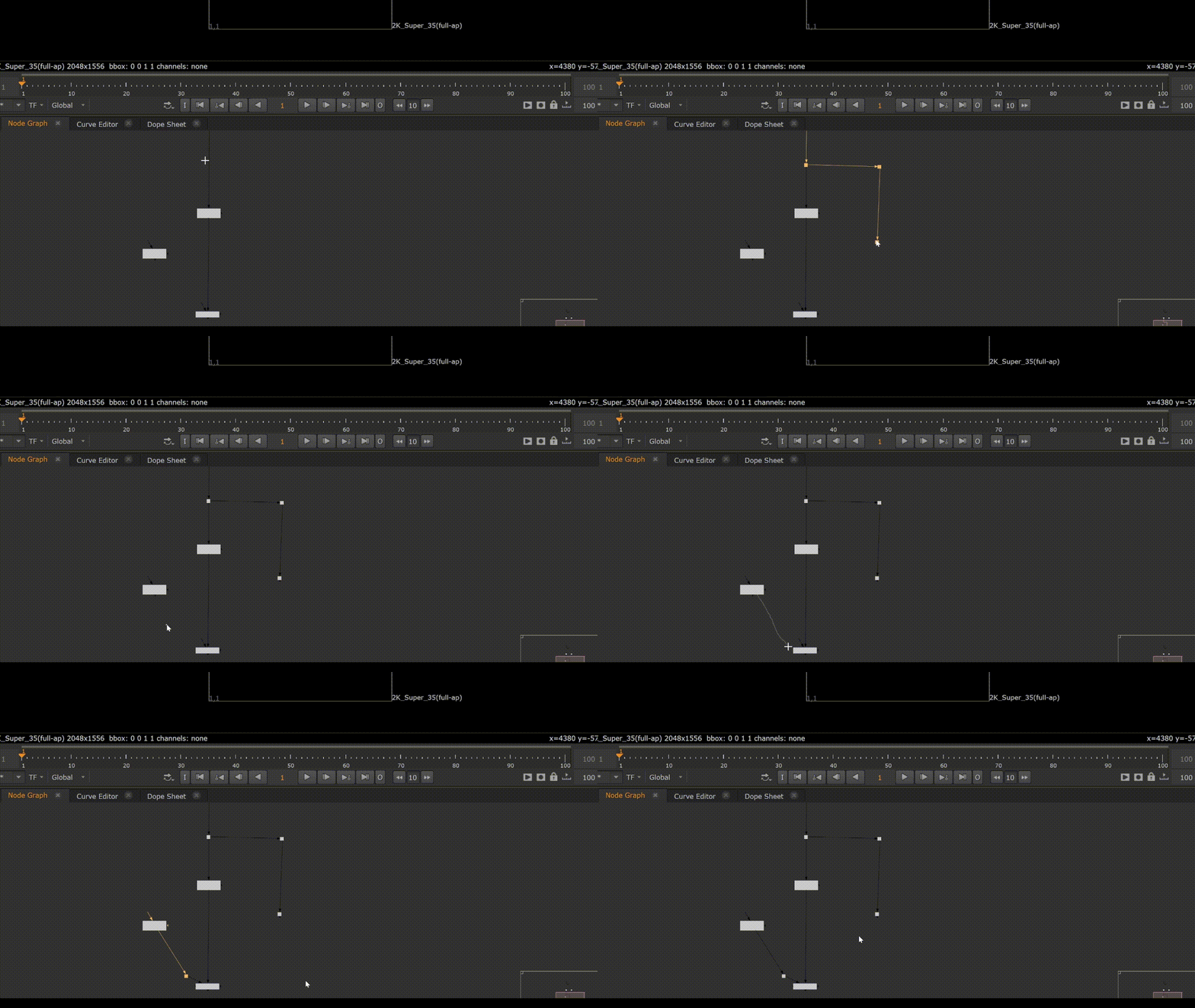
NukeDrawDots lets you draw the route you want through the Node Graph instead of placing Dot nodes one at a time.
Press Shift+D, drag the path, and release. NukeDrawDots converts your stroke into a chain of Dots and can automatically connect it to nodes or splice it into existing pipes.
Useful for routing connections around busy node graphs, especially when you need clean right-angle layouts.
Features
Draw Dot chains directly in the Node Graph
Automatically connect to nodes
Splice into existing pipes
Right-angle routing
Grid snapping
Path simplification to remove mouse jitter
Single-step undo
Non-destructive preview mode
Backdrops and Sticky Notes are ignored when finding connections
Existing node connections are never overwritten
No third-party dependencies
Usage
With the Node Graph focused:
Shift+D → Click and drag → Release
The cursor changes to a crosshair while drawing.
Press Escape or right-click to cancel.
The resulting path is converted into Dot nodes using the current Draw Dots settings.
Draw Dots Settings

Open:
Nodes → Other → Draw Dots Settings...
The settings panel is non-modal and can remain open while working.
Simplify
Controls how far the generated path may deviate from the original stroke. Higher values produce fewer Dots while preserving meaningful corners.
Right angles
Converts the path into horizontal and vertical segments. Enabled by default.
Snap to grid
Aligns generated Dots to the current Node Graph grid.
Connect
Automatically connects the generated chain to nodes or existing pipes. Enabled by default.
Show this panel after every stroke
Displays a live preview of the generated Dots, allowing the path to be adjusted before committing it.
Connecting
Connections are determined by where you draw, rather than which nodes are selected.
Nodes
Start a stroke on a node and the first Dot uses that node's output.
End a stroke on a node and the chain connects to its first available input. Existing connections are never overwritten.
Merge mask inputs are ignored when looking for a free input.
Existing pipes
Start or finish the stroke on an existing connection to splice the Dot chain into the pipe.
The Dot placed on the pipe carries the existing connection, while the remainder of the drawn path extends from that Dot as a free connection.
Straight connections
If you draw directly from one node to another without creating a bend, no unnecessary Dot is created. The nodes are simply connected.
Dots are also not placed directly on top of, or immediately against, the destination node.
Other Node Graph elements
Backdrops and Sticky Notes are ignored when detecting connection targets.
Nodes that cannot accept an input are also ignored.
Undo
The entire operation is performed as a single undo step.
One Ctrl+Z removes the complete Dot chain.
Newly created Dots remain selected after the operation.
Installation
Copy:
nuke_draw_dots.pymenu.py
into your .nuke directory and restart Nuke.
If you already have a menu.py, append the supplied contents rather than replacing your existing file.
See INSTALL.txt for detailed installation instructions.
Requirements
No third-party Python packages are required.
The tool automatically detects the Qt binding used by Nuke:
PySide2: Nuke 14.1–15.x
PySide6: Nuke 16+
Compatibility
Tested on:
Nuke 14.1v8 — Windows
Nuke 17.1v1 — Windows
Import and Qt symbol resolution have also been verified on:
Nuke 15.2v9
Nuke 16.0v8
Nuke 16.1v1
Nuke 17.0v4
Windows, Linux and macOS are supported.
Diagnostics
NukeDrawDots uses a Qt event filter and a translucent overlay above the Node Graph.
If the tool behaves unexpectedly on an unsupported Nuke version, two built-in diagnostics are available from the Script Editor:
nuke_draw_dots.diagnose()
nuke_draw_dots.key_probe()
The README contains information on interpreting their output.
You can also test another keyboard shortcut without editing the file or restarting Nuke:
nuke_draw_dots.set_shortcut("E")
Source
https://github.com/bratgot/NukeDrawDots
License
MIT License. See the included LICENSE file.
MIT License
Copyright (c) 2026 Marten Blumen
Permission is hereby granted, free of charge, to any person obtaining a copy
of this software and associated documentation files (the "Software"), to deal
in the Software without restriction, including without limitation the rights
to use, copy, modify, merge, publish, distribute, sublicense, and/or sell
copies of the Software, and to permit persons to whom the Software is
furnished to do so, subject to the following conditions:
The above copyright notice and this permission notice shall be included in all
copies or substantial portions of the Software.
THE SOFTWARE IS PROVIDED "AS IS", WITHOUT WARRANTY OF ANY KIND, EXPRESS OR
IMPLIED, INCLUDING BUT NOT LIMITED TO THE WARRANTIES OF MERCHANTABILITY,
FITNESS FOR A PARTICULAR PURPOSE AND NONINFRINGEMENT. IN NO EVENT SHALL THE
AUTHORS OR COPYRIGHT HOLDERS BE LIABLE FOR ANY CLAIM, DAMAGES OR OTHER
LIABILITY, WHETHER IN AN ACTION OF CONTRACT, TORT OR OTHERWISE, ARISING FROM,
OUT OF OR IN CONNECTION WITH THE SOFTWARE OR THE USE OR OTHER DEALINGS IN THE
SOFTWARE.
or register to download or rate.
Comments